
What integrations does Bread & Butter support?
Bread & Butter is built to slide into your existing tech stack. We don't want you to rip and replace the tools your team already relies on; we plug into the infrastructure you have and feed it verified, researched profiles, Focused Score and the written context your reps need.
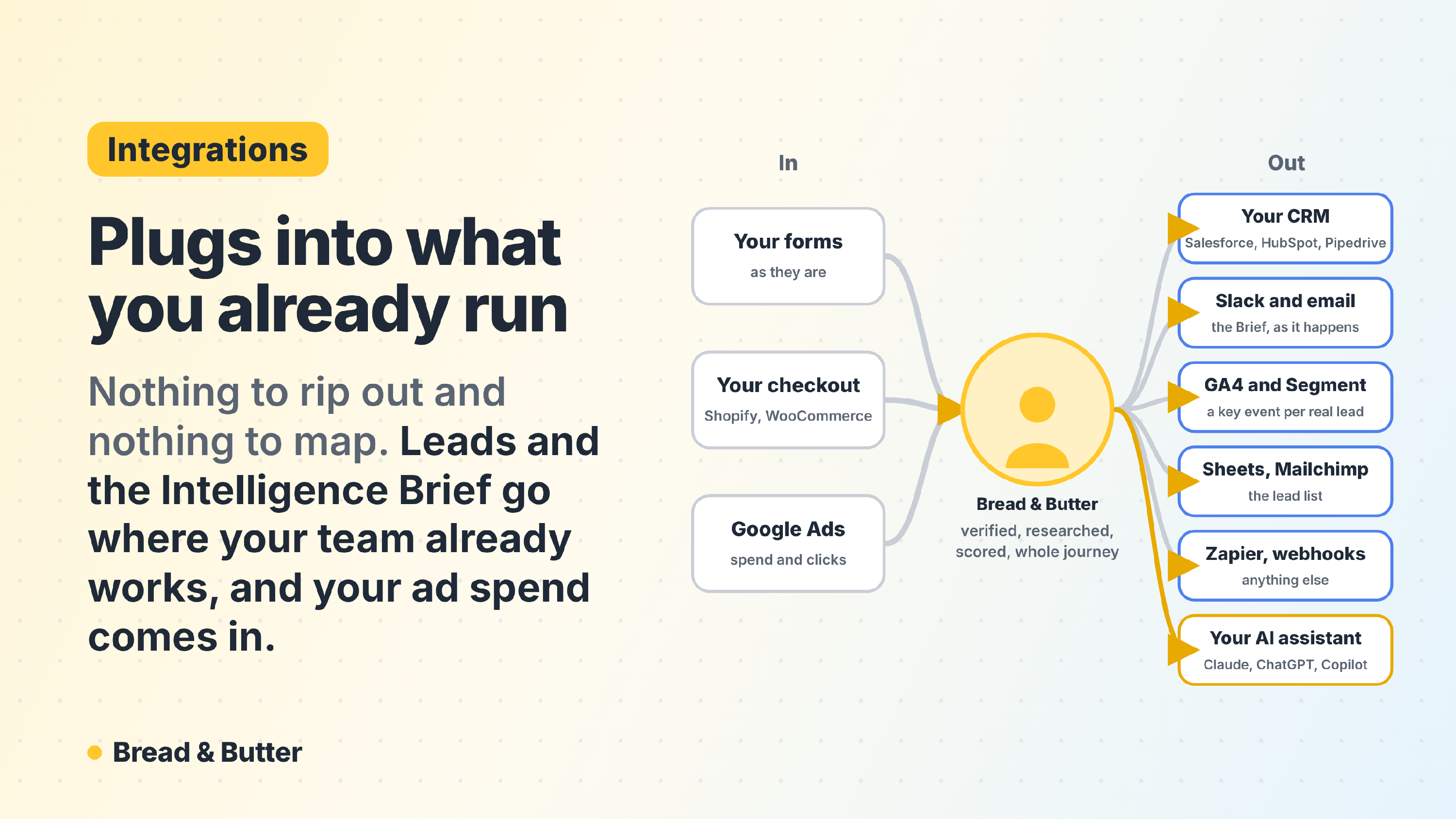
In short: Bread & Butter connects to Salesforce, HubSpot, Pipedrive, Mailchimp, Google Analytics (GA4), Segment, Slack, email, Google Sheets, Zapier, any webhook and Google Ads, and any funnel can be exported as a CSV. Each integration is set up once, in one dialog, with a trigger (a lead stage, or a funnel you've saved) and what to send: the List, the Intelligence Brief or the Intelligence Stream. Which destinations can receive which payload on each plan is set out in Integrations and Automation: what you can send, where, and when. Your AI assistant connects too, through the Bread & Butter MCP server, so you can ask anything and run any report. On your website nothing changes: the tracking script captures your existing forms and checkouts as they are.
CRMs and Marketing Lists
Your CRM is only as good as the data inside it. Bread & Butter connects to Salesforce, HubSpot and Pipedrive so your sales team never relies on manual data entry or guesswork. You set the integration up once: connect the CRM, choose the trigger and choose what to send. There's nothing to map.
The List creates the lead or contact with their name and email address as soon as they qualify. The Intelligence Brief goes in once the visit ends, up to an hour after the lead's last activity: as a post on the lead's Chatter feed in Salesforce, or a note on the record in HubSpot and Pipedrive. It carries the Focused Score, the lead's role and company, Outreach Starters, a summary of the visit and the User Journey Summary, so a rep can read it in seconds. A fresh Brief is added after every return visit, so the record is never stale. Sending to a CRM needs the Pro plan. See The Intelligence Brief.
Mailchimp adds each lead's name and email address to the audience you choose, or removes them from it, so your lists fill with verified addresses on their own.
Setup guides: Salesforce, HubSpot, Pipedrive, Mailchimp.
Analytics and Events
Stop relying on bot-heavy metrics. Send your real leads into your analytics tools.
Google Analytics (GA4) records a key event you name each time a lead reaches your trigger, so your goals reflect real leads rather than thank-you page loads. Segment receives each lead's details when they reach your trigger, ready to route on to the rest of your stack.
Setup guides: Google Analytics (GA4), Segment.
Productivity and Communication
Never miss a high-intent buyer. Put your leads where your team already looks.
Slack posts a message to the channel you choose: the List as soon as a lead qualifies, or the Intelligence Brief once their visit ends, headed New lead or Repeat visit.
Email sends your team the Intelligence Brief when a new lead arrives and when a lead comes back, with What's interesting right after the lead's card, for teams that don't run a CRM or want the heads-up in their inbox as well.
Google Sheets keeps a live sheet of leads for reporting or hand-off, one row per lead in four fixed columns: Email Address, First Name, Last Name and Profile URL.
CSV export isn't an integration, but any funnel can be exported as a file from your dashboard for tools that aren't connected.
Setup guides: Slack, Google Sheets.
Custom and Advanced Automations
Build any workflow you can think of, with or without code.
Zapier connects two ways. The Zapier App is set up inside Zapier and starts a Zap with the List. A Zapier Webhook is set up in Bread & Butter and can send the List, the Intelligence Brief or the Intelligence Stream into a Zap.
Webhook sends the List, the Intelligence Brief or the Intelligence Stream as JSON to any URL you choose, such as n8n, Make or your own server, signed so you can confirm each delivery came from us. The Intelligence Stream, the full session-by-session history behind the Brief, is only available through Zapier Webhook and Webhook. See The Intelligence Stream.
Setup guides: Zapier App, Zapier Webhook, Webhook, and Field Mapping Definitions for every field they carry.
Your AI assistant
Connect Claude, ChatGPT or Microsoft Copilot to Bread & Butter through the Bread & Butter MCP server and ask what you'd ask an analyst: what's wasting ad money, which pages bring the people who become customers, who came back this week. Run any of the ready-made reports by name, change them to fit what your team wants to see, or put them on a schedule. Connecting an AI assistant is part of the Pro Plus plan and the free trial. See Bread & Butter MCP server connections.
Advertising and Partners
Google Ads works the other way round: rather than sending your leads out, it brings your campaign and keyword spend in. The Ads Spend report and the Attribution & Leads report set that spend against the Focused visitors and leads each campaign produced, so you see what your paid traffic really costs. See Google Ads, Ads Spend report and What is the primary purpose of the Attribution Report?
On your website: CMS, e-commerce and existing forms
Bread & Butter works alongside your website, not instead of it. Through the WordPress plugin or the universal JavaScript snippet, it runs across your primary domain, landing page subdomains and third-party hosted platforms, and nothing on the site changes: you keep your current forms, your CSS and your layout.
The tracking script detects the email fields on your existing forms and captures the submission in the background. When a visitor enters their email address into any form on your site, including newsletter subscriptions, gated content and multi-step applications, the address passes through Real-Time Email Verification, the visitor's whole journey is attached to the new profile, and Profile Enrichment starts. With the WordPress plugin, the script is served from your own domain and the data is delivered from your own server, so the whole path is first-party and it isn't the kind of tracking that Safari's tracking protection or ad blockers are built to stop. See How does Real-Time Email Verification protect my Focused Tab?, How Bread & Butter works with your existing forms & subscribe widgets and Server-Side vs. Browser-Side Tracking: The Reliability and Ethics of Bread & Butter.
All popular form types and providers are supported:
- CRM forms: HubSpot, Salesforce, Marketo and Pipedrive.
- Standard web forms: Contact Form 7, WPForms, Gravity Forms, Elementor and Ninja Forms.
- Custom and hard-coded forms: any standard HTML or JavaScript input.
- E-commerce checkouts: Shopify, WooCommerce and custom cart pages.
Beyond forms, the script runs on Webflow, Squarespace, Wix, HubSpot Content Hub, Weebly, Framer, Unbounce, Instapage, Leadpages, ClickFunnels, Carrd, Ghost, Systeme.io, BigCommerce, Magento, PrestaShop, Ecwid, Lightspeed eCom, Thinkific, Kajabi, Mighty Networks, Circle.so, Zendesk Guide, Intercom, Help Scout and more. Every platform has its own install guide in How to Install Bread & Butter on Your Website.
By keeping your existing forms you avoid the work of a migration, while every email submission becomes a full, scored profile.
Related
- Integrations and Automation: what you can send, where, and when
- The Intelligence Brief: Living Context in the Tools Your Team Already Uses
- The Intelligence Stream: The Complete Record Behind Every Summary
- Field Mapping Definitions
- Bread & Butter MCP server connections
- How Bread & Butter works with your existing forms & subscribe widgets
- Server-Side vs. Browser-Side Tracking: The Reliability and Ethics of Bread & Butter
- How to Install Bread & Butter on Your Website