
How Bread & Butter works with your existing forms & subscribe widgets
Every place you collect an email address on your website is a place you've been getting less than you should. Your form takes a name and an address and sends them on. Bread & Butter leaves the form exactly as it is and does the rest: checks the address, researches the person and their company, scores how closely they read, and joins everything they did on your website before the form to the same profile. Nothing to rebuild, nothing to reconfigure. Install, submit, and come back tomorrow.
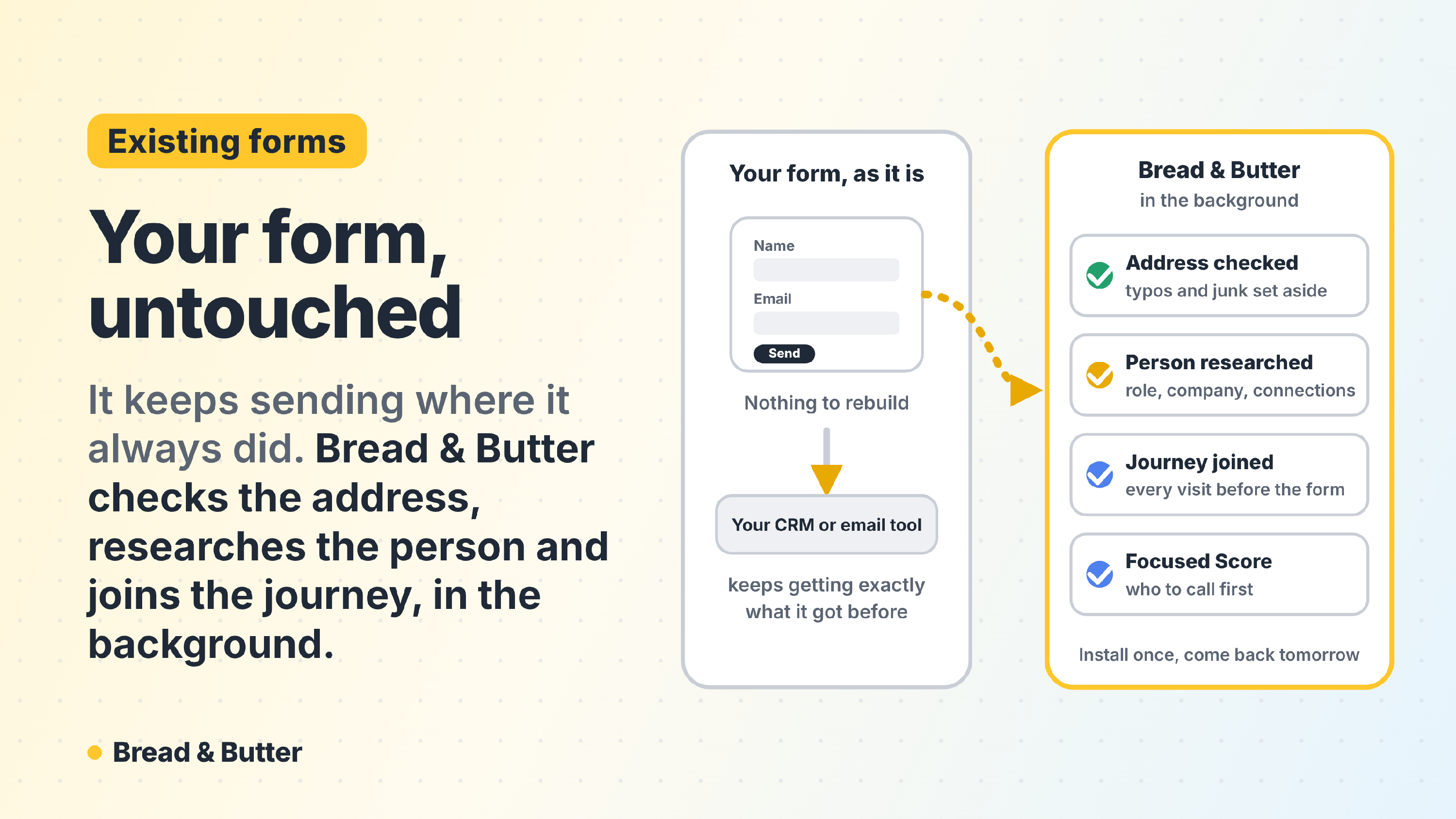
In short: Bread & Butter works with the forms and subscribe widgets you already have: WPForms, Gravity Forms, Contact Form 7, HubSpot, Elementor, Mailchimp and the rest, and with the other places people raise a hand, such as your checkout or your booking page. You don't replace or rebuild anything, map fields or change where submissions go. It listens for the submission in the background, verifies the email address, researches the person with Profile Enrichment, gives them a Focused Score from everything they read before they filled in the form, and puts the best ones in your Focused Tab. Your CRM, your email tool and your automations keep getting exactly what they got before. On WordPress the plugin does the whole install; on any other platform it's one tracking code.
Do I need to replace or rebuild my forms?
No. Bread & Butter works with the forms already on your website. There is nothing to configure: no fields to map, no styling to touch, no change to what your visitors see. It watches your existing forms in the background and picks up each submission as it happens.
Does it change how my leads reach my CRM or mailing list?
No. Your workflow stays exactly as it is. If a form sends submissions to HubSpot, triggers a Mailchimp email or posts to a Slack channel, it keeps doing that. Bread & Butter runs alongside: it reads the submission, verifies the address and researches the person, and the result appears in your Bread & Butter dashboard and, if you've connected one, in your CRM as an Intelligence Brief. Nothing is held back or rerouted. See What integrations does Bread & Butter support?
How complicated is the setup?
On WordPress, one plugin: search for Bread & Butter in the plugin library, install and activate it. On any other platform, one tracking code pasted once, directly or through Google Tag Manager. Nothing else changes. See How to Install Bread & Butter on Your Website.
Will it slow down my website?
No. On WordPress the plugin keeps everything first-party, so the visitor's browser only ever talks to your own website. On other platforms the tracking code loads in the background. Either way it has no effect on your page speed or your core web vitals, and your visitors never see it.
How do I know it's working?
Once Bread & Butter is installed, open your website in a private window and fill in one of your own forms with your own email address. Submit it. It feels exactly as it always has. Close the tab and go about your day; there is nothing to click and nothing to sync.
What happens to that submission?
The moment the form is submitted, three things start:
- The email address is verified, so your team isn't chasing a typo or a made-up address. It doesn't need to be a work address: a personal address, Gmail included, is checked and researched the same way.
- Profile Enrichment researches the person: who they are, their role and seniority, their professional profiles, and the company behind them, its size, industry, recent news and the other people there worth knowing. See What is Profile Enrichment, and what does it find?
- Focused Score reads everything they did before the form: every visit, every page, how closely they read, across the whole website, and gives them a score from 1 to 10 against every other visitor on your site. See What is Focused Score and how does it evaluate my traffic?
The research takes a few minutes to do properly, and it's worth the wait.
Not only forms
A form is one way to raise a hand. Bread & Butter picks up the others the same way, with nothing to change on your side: a newsletter or subscribe widget, a checkout on Shopify or WooCommerce, a booking through Calendly or Google Calendar, a download, or a visitor who continues with an account they already have. Whichever way the email address arrives, everything that person did on your website before that moment is already joined to them, and the same research and the same score follow. See Install Bread & Butter on Shopify and Install Bread & Butter on WooCommerce.
What will I see in my dashboard?
The email address your form collected has become a person: a verified name and a working address, their role and professional profiles, their company's size, industry and website, and the journey that led to the form, pages, visits and return visits included.
The research goes further than a contact record: buying triggers such as recent news, launches and funding, the other people at the company worth knowing, and the person's own track record, so your team can open with something that matters to them. All of it is written up in the Intelligence Brief, which also lands in your CRM. See The Intelligence Brief.
How does this help my sales team decide who to call first?
Capturing the research is half the job; knowing who to call first is where the money is. Instead of a spreadsheet of raw submissions, the best leads go to your Focused Tab. Focused Score builds a model of your own website's visitors (it takes about 15 days to calibrate) and ranks every lead from 1 to 10. The Focused Tab leaves out bots, visits that left in seconds and your own team, and shows the real people who scored 6 or higher. Your team opens the Focused Tab and starts calling. See What is the Focused Tab, and how is it different from Engaged Leads?
Want one-click verification on top of your forms?
If you'd like visitors to verify who they are in one click and have their name and email filled in for them, the Form Booster adds that on top of your existing form, with nothing about the form or where it sends changing. See Form Booster (Works with your existing forms). For the people your forms miss, the other conversion tools add a one-click way to raise a hand with the account they already use, Google, LinkedIn, Microsoft and more, on any page. See Conversion tools overview.
Supported forms
Bread & Butter works with the form tools people actually use, including WPForms, Ninja Forms, Formidable Forms, Gravity Forms, HubSpot, Salesforce, Unbounce, Contact Form 7, Elementor, Mailchimp, Pipedrive, Typeform, Jotform, ActiveCampaign, Marketo, Pardot, Zoho Forms, Cognito Forms, Paperform, Klaviyo, ConvertKit, Constant Contact, OptinMonster, Thrive Leads and Webflow. If yours isn't listed, it almost certainly works too; ask us through the chat.
Related
- Form Booster (Works with your existing forms)
- How does Bread & Butter eliminate spam without making me rebuild my existing web forms?
- What is Profile Enrichment, and what does it find?
- The Intelligence Brief
- What is Focused Score and how does it evaluate my traffic?
- Does Bread & Butter show the full journey before a lead converts?
- Conversion tools overview
- Install Bread & Butter on Shopify
- Install Bread & Butter on WooCommerce