
Form Booster (Works with your existing forms)
The Form Booster is a massive upgrade for your conversion strategy that requires absolutely zero changes to your existing workflows. There is no coding required. It simply works directly on top of your current forms, adding an incredible layer of features to help you capture verified leads.
When given the option, 76% of visitors choose social logins over manually typing their information. However, for those who prefer traditional methods, we also provide a highly secure email, password, and pin verification process. By adding this frictionless net, you completely eliminate guesswork and ensure you only capture pristine, verified first party data regardless of how they choose to connect.

How the Form Booster Works
The magic of this tool is that it integrates flawlessly with what you already built. Nothing about your underlying form or routing changes.
When a visitor clicks into any field on your existing form, the Form Booster widget instantly pops up. It gives them the option to verify their identity with a single click using Google, Microsoft, LinkedIn, or Apple, or by using a secure email and pin combination. Once they connect, the tool automatically fills in their first name, last name, and email address. From there, the visitor simply clicks your standard submit button, and the lead routes exactly where your form submit usually goes.
The Ultimate CRM Firewall: Sanitize and Validate First
Many of our most successful customers use the Form Booster to completely protect their sales database from junk data. Instead of having your form push leads directly into your CRM, you can route all submissions through Bread and Butter first.
By utilizing our powerful Automation and Integrations engine, Bread and Butter acts as an intelligent firewall. When a form is submitted, our system instantly sanitizes the data, validates the identity, and enriches the profile. The platform then evaluates the prospect using our LeadScore AI, upgrading them to a verified MQL before successfully passing them to your CRM. This guarantees that your sales team only spends their time on pristine, high intent prospects, while unverified or low score submissions remain safely quarantined in your Funnel.
How the Form Booster Boosts Your Legacy Forms
- Instant Verification: You get confirmed identities instead of fake test data. Whether they use a social login or our secure pin process, you are guaranteed a real profile, ensuring every new lead in your Funnel is an actual professional.
- Built In Smarts and Zero Conflict: The widget is highly intelligent. If a visitor actively closes the prompt, it remains hidden for twenty four hours so they can fill out the form manually if they prefer. It never breaks your existing website experience.
- The One Time Conversion Guarantee: Just like our other tools, the moment a visitor is converted, they are issued a secure session across your entire website. We never bother them again. They will never have to verify their identity again to bypass any of your forms or access your gated content.
- Eliminate Spam to Almost 0%: Take your forms to the next level. Because social platforms and our pin verification system require real identities, the Form Booster acts as a flawless gatekeeper. It eliminates spam form submissions to almost 0%, allowing you to completely remove those annoying visual CAPTCHAs that kill your conversion rates.
- Instant CRM Sync: The exact moment the form is submitted, the enriched, verified profile flows directly into your Bread and Butter dashboard, your Nurture Action Queue, and your CRM.
Supported Form Integrations
The Form Booster is designed to enhance the tools you already use. It is fully compatible with the absolute best platforms on the market:
- WPForms: Enhance your custom drag and drop layouts with verified one click login.
- Ninja Forms: Add verified identity capture to your complex WordPress form builds.
- Formidable Forms: Supercharge your advanced data collection with real human profiles.
- Gravity Forms: Pair the ultimate WordPress form builder with flawless lead verification.
- HubSpot: Seamlessly integrate with your inbound marketing engine to ensure every new lead is a verified professional.
- Salesforce: Feed your enterprise CRM with pristine contact data directly from your web forms.
- Unbounce: Maximize your landing page ROI by completely removing friction from your conversion process.
- Contact Form 7: Upgrade the most popular WordPress contact tool with modern secure login capabilities.
- Elementor: Turn your beautifully designed page layouts into high converting lead generation engines.
- Mailchimp: Build a perfectly clean email list filled only with verified human subscribers.
- Pipedrive: Accelerate your sales pipeline by feeding your team with high intent, verified prospects.
Customizing Your Form Booster
Setting up and customizing your Form Booster is incredibly simple. Because it integrates directly into your WordPress block editor, you can activate it and tailor the messaging in just a few clicks without ever touching a line of code. Here is the exact process to get your form protected and ready to capture verified leads.
- Open Your Page: Inside your WordPress admin dashboard, navigate to the specific page or post where your existing contact form is embedded. Open it in edit mode.
- Add the Block: Click to add a new WordPress block. Search for Form Booster in the block menu and add the element to your page.
-
Enable the Tool: Click the toggle slider within the block settings to officially enable the Form Booster for this specific form.
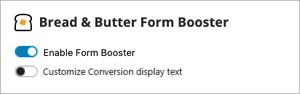
- Customize the Messaging (Optional): Toggle the Customize Conversion display text option if you would like to change the default message that appears on the widget. You have full control to edit all or just a few of the text fields to perfectly match your specific brand voice.
-
Adjust the Verification Method (Optional): You can easily change the Email based conversion method. Simply switch the setting from Email + Password + PIN to a Sign in link if you prefer to offer a magic link style authentication instead.

- Save and Launch: Click Save or update the page. Your form is now fully gated and ready to capture pristine, verified data!
