
Executive report
Who this is for: owners, CEOs and the board, and the marketers and agencies who report to them.
What you'll learn: what the Executive report shows, how it differs from the Report for Your Boss, how to run it in your AI assistant, and how to bring it to a board meeting.
The people who sign off the budget don't want a dashboard. They want to know in two minutes whether the website and the marketing are working, and where the next dollar should go. The Executive report answers that on one printed page, in business terms, with no jargon and no technical to-do list.
In short: The Executive report is a ready-made report your AI assistant builds from your Bread & Butter data, monthly or quarterly. It fits on one printed page: a headline that says how the period went, four results as percentages (visitors, the share who read closely, the registration rate, and how much of the ads budget sits on the weakest campaign), three things the board should know, how each campaign performs, and where to put more money. It never names a visitor or a lead, and it leaves anything technical to the Health check. It's first in Run all my Bread & Butter reports. Owners, Administrators and Marketers can run it.
What the report answers
Did the website and the marketing work this period? One headline and two or three sentences with the main numbers, against the period before.
Are we bringing in buyers, or just traffic? The share of visitors who read closely, and the share of those who registered, side by side, so a drop in visitors that brought more buyers reads as the good news it is.
What did buyers want? Three things to know: the plan, product or service buyers narrowed down to, where they came from, and how the period compares.
Where should the next dollar go? Up to three things to keep or fund more, each with the number behind it, and at most one campaign to review before adding to it.
What's in it
The whole report is one page:
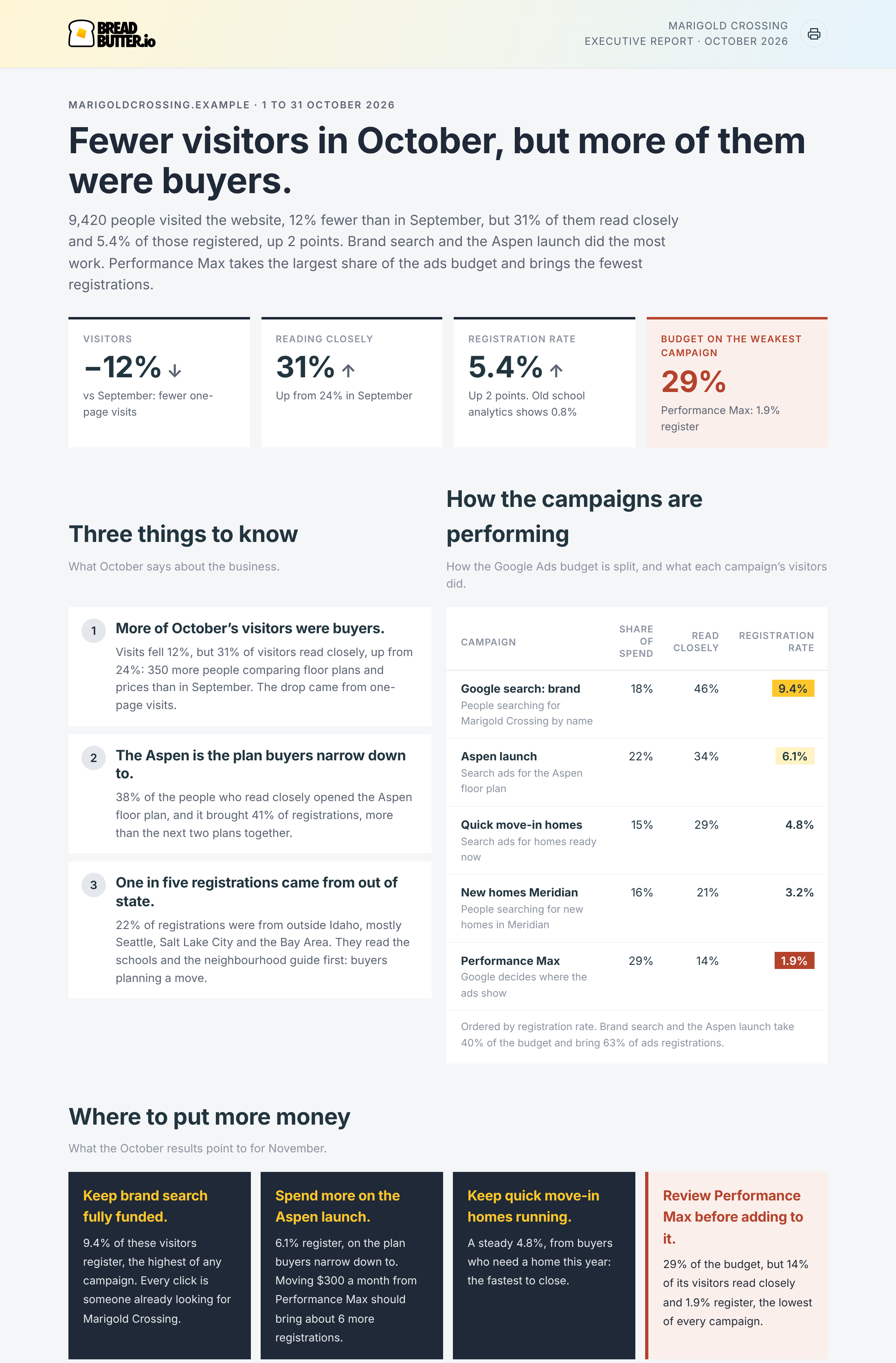
A sample report for a fictional business. Your report uses your own website's numbers.
The headline. One sentence that says how the period went, and two or three more with the main numbers.
Four results. Each one is a percentage, so it reads the same for a small website and a large one:
- Visitors: the change against the period before.
- Reading closely: the share of visitors who read closely (your Focused Rate), with the period before.
- Registration rate: the share of those close readers who registered, and how many points it moved.
- The money tile: the share of the ads budget on the weakest campaign. Without ads spend, it's the share of registrations from your top source.
Only the one result the board needs to look at is shown in red, and never more than one.
Three things to know. Three findings about the business, each a bold headline and a sentence or two with the numbers.
How the campaigns are performing. Up to six campaigns, ordered by registration rate, with their share of the spend, the share of their visitors who read closely and their registration rate. The best is highlighted, and a campaign that registers people at less than half the average is marked. Without ads spend, the table shows your sources instead (search, email, social, referrals), without the spend column.
Where to put more money. Up to three things to keep or fund more, each with the number that supports it, and at most one marked Review before adding to it. Any amount comes from your own spend data, and an estimate always says "about".
How it differs from the Report for Your Boss
The Report for Your Boss is for the marketer's manager. It shows the work: what's interesting on your website, who was on it, what they wanted, and the numbers that show marketing is working. See Report for Your Boss.
The Executive report is for the people who sign off the budget. It's shorter, it never names a person, and it ends with where to put more money.
Neither one has technical items. Tracking, tags, settings and anything for your web team go in the Health check, which runs with your reports. See [Health check]([LINK: Health check article]).
How to run it
Connect your AI assistant to Bread & Butter first. See Bread & Butter MCP server connections.
Ask for it by name, with a period:
- "Run my Bread & Butter Executive report for last month."
- "Run my Bread & Butter Executive report for the last quarter."
- "Run my Bread & Butter Executive report for last month, for my main website."
It's also the first report in "Run all my Bread & Butter reports".
More than one account. If you can reach several Bread & Butter accounts, name the one you want. If you don't, your assistant asks which one first.
On a schedule. Ask your assistant to run it on the first of every month, or the first of every quarter before the board meets. See Run your Bread & Butter reports on a schedule.
Each run uses credits. See How do Credits work across storage, syncing, and profile enrichment?
Bringing it to the board
Print it or save it as a PDF. It's built to fit one page on Letter and A4. Printed copies leave out the prompt and the schedule box.
Your brand. When your account has a brand kit, the report uses your logo and colours.
For an agency. Run it for each client before their monthly or quarterly review. It's the page the client's owner reads; the other reports are the detail behind it.
When the board asks a question. Every number comes from your Bread & Butter data. Ask your assistant the question that follows, for example "Show me each campaign's registrations month by month this year."
What it needs
Bread & Butter installed on your website. See How to Install Bread & Butter on Your Website.
Your ads account connected, for the spend column and the money tile. Without it, the report shows your sources instead. See Connect Google Ads.