
Report for Your Boss
Who this is for: marketers and sales leads who report up to an owner, a director or a board, and digital agencies who send their clients one page that sums up the month.
What you'll learn: what the Report for Your Boss shows, why it opens with people instead of numbers, how to run it in your AI assistant, how to send it to your boss or your client, and how to take it further with your own questions.
Most summaries for a boss are a page of totals: visits, sessions, a conversion rate, an arrow up or down. They say how busy the website was, not who was on it or what they wanted. The Report for Your Boss starts from the other end: the people who did something worth knowing on your website, by name, and then the few numbers that show the website is working.
In short: The Report for Your Boss is a one-page report your AI assistant builds from your Bread & Butter data, for any period you choose. It opens with What's interesting on your website: the people who did something worth knowing, each linked to their profile, then what visitors as a whole kept coming back to. Under it are four headline figures, who your leads are, how the website did month by month, three leads Bread & Butter researched for you, and one card each from the ads, exit destinations, AI assistants and bots reports. Every section comes from one of your other Bread & Butter reports, so your boss can open the full report behind any of them. Owners, Administrators and Marketers can run it.
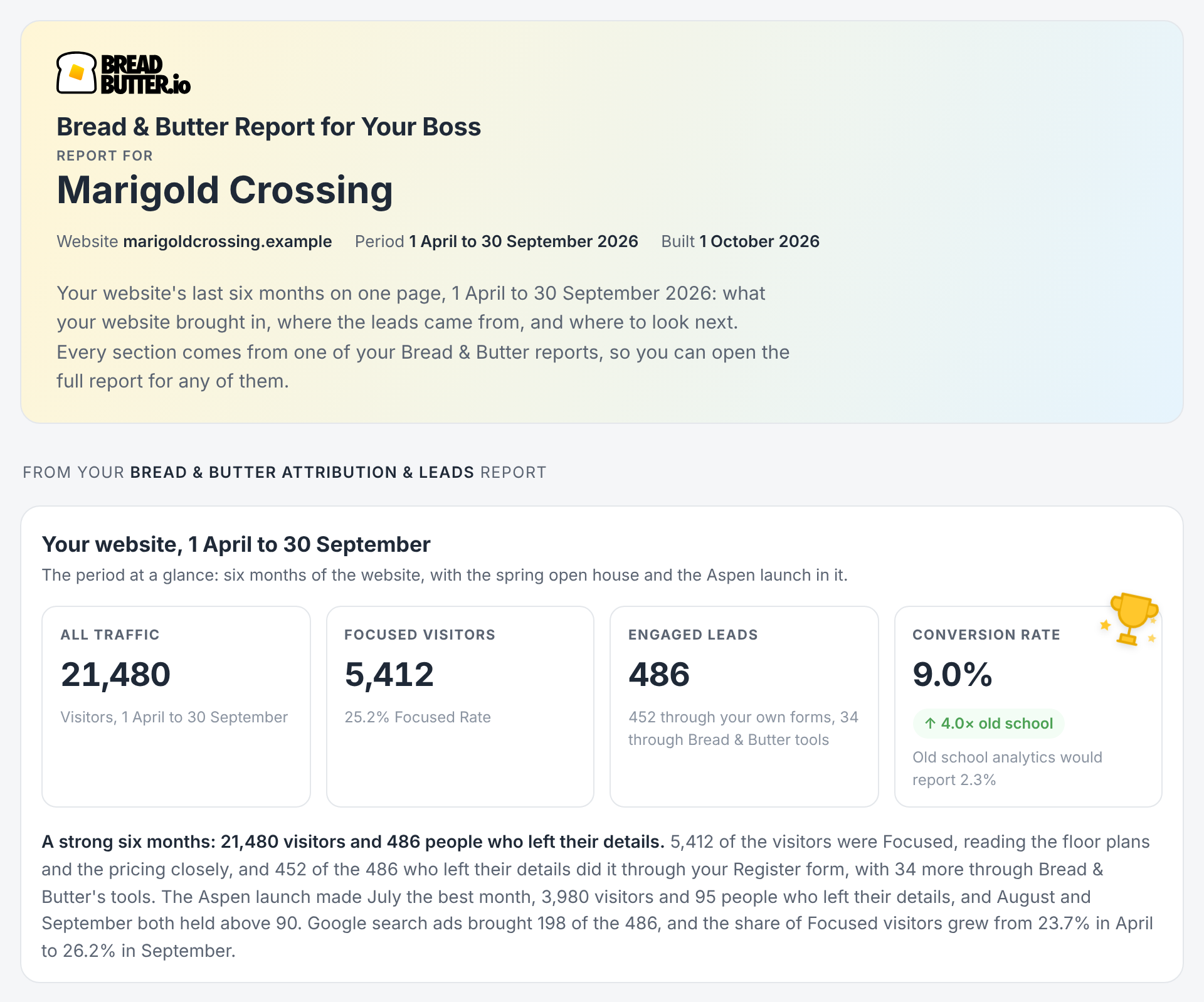
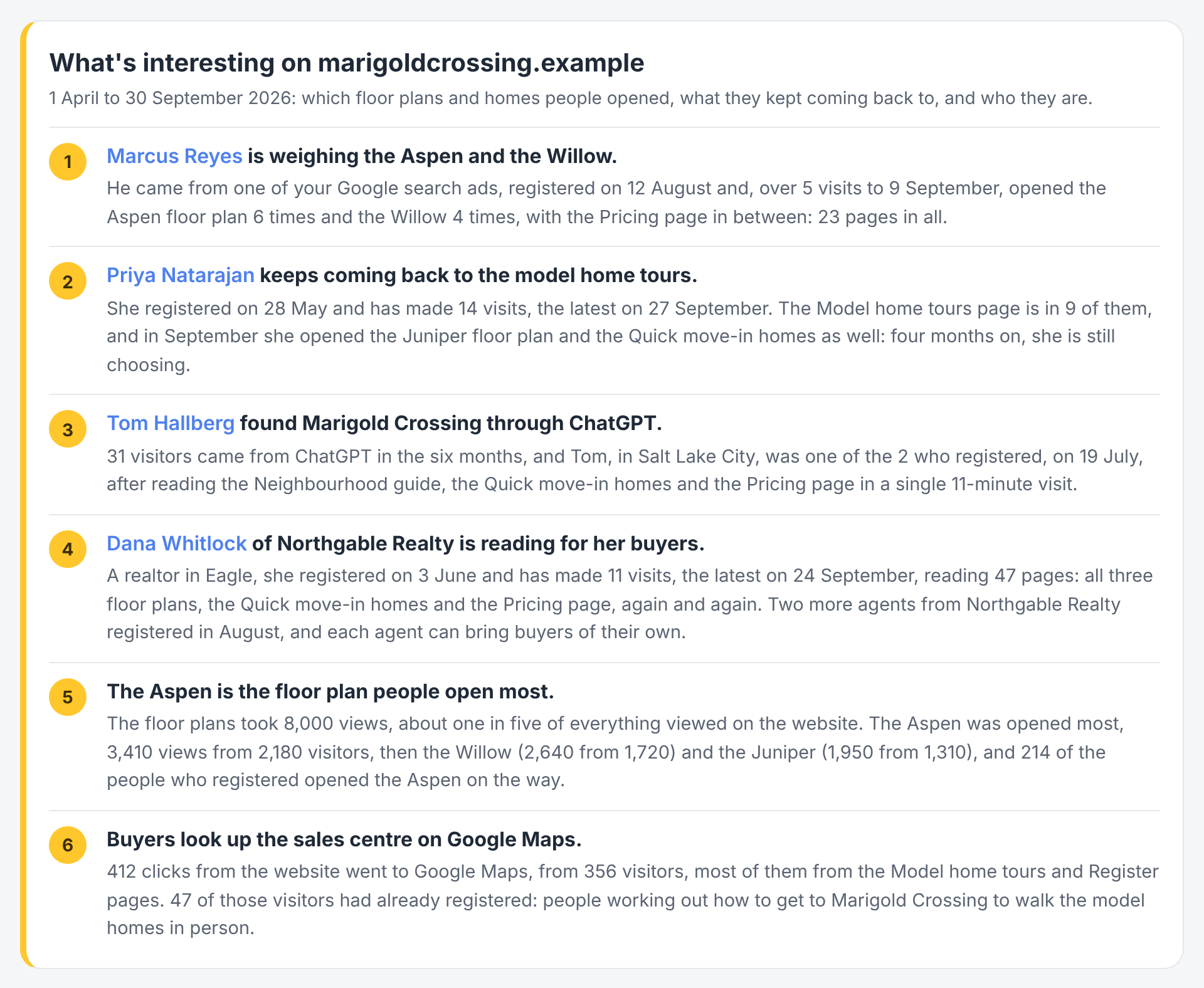
A sample report for a fictional business. Your report uses your own website, pages and people.
What the report answers
Who was on the website, and what did they want? Not a visitor count: the people who came back, compared two options, booked, or read the page that matters, by name.
Is the website working? Four figures for the period, each against the period before, and a short paragraph on what grew and what worked.
Who are the leads? Their seniority, department, industry and company, from the research Bread & Butter does on every lead.
Where should we look next? Each section points to the full report behind it, so the conversation can go deeper on whatever catches your boss's eye.
What's in it
The report opens with a short line on what the page covers, then What's interesting on your website: five to eight items, each a bold headline and a sentence or two with the numbers.
- The people first. Every named visitor who did something worth knowing comes first, one item each, with their name at the start of the headline and linked to their profile in Bread & Butter: someone weighing two options, someone who keeps coming back to the same page, someone who found you through an AI assistant, an agent reading on behalf of their buyers.
- Then what visitors did as a whole. The product, plan or page people open most, the option with a following of its own, where people go next (a booking page, a map, a partner's website), and the kind of visitor turning up.
It is written in your business's own words: a homebuilder sees floor plans and model home tours, a store sees products, a B2B company sees the companies and the pages they compared. Your own team, your agencies and test records are never named.
Then come the sections, each one taken from another report:
Your website, at a glance. Four figures for the period against the period before, and a paragraph on what grew and what worked. From Attribution & Leads.
Who they are. Your Engaged Leads by seniority, department, industry and company, from Bread & Butter's profile research. From Attribution & Leads.
Visitors and Engaged Leads, month by month. All visitors and Focused visitors each month, with the Engaged Leads captured by your own forms and by Bread & Butter's conversion tools. From Attribution & Leads.
Leads we captured for you. The leads Bread & Butter's conversion tools brought in on top of your forms. Only shown when your website uses them. From Leads we found for you.
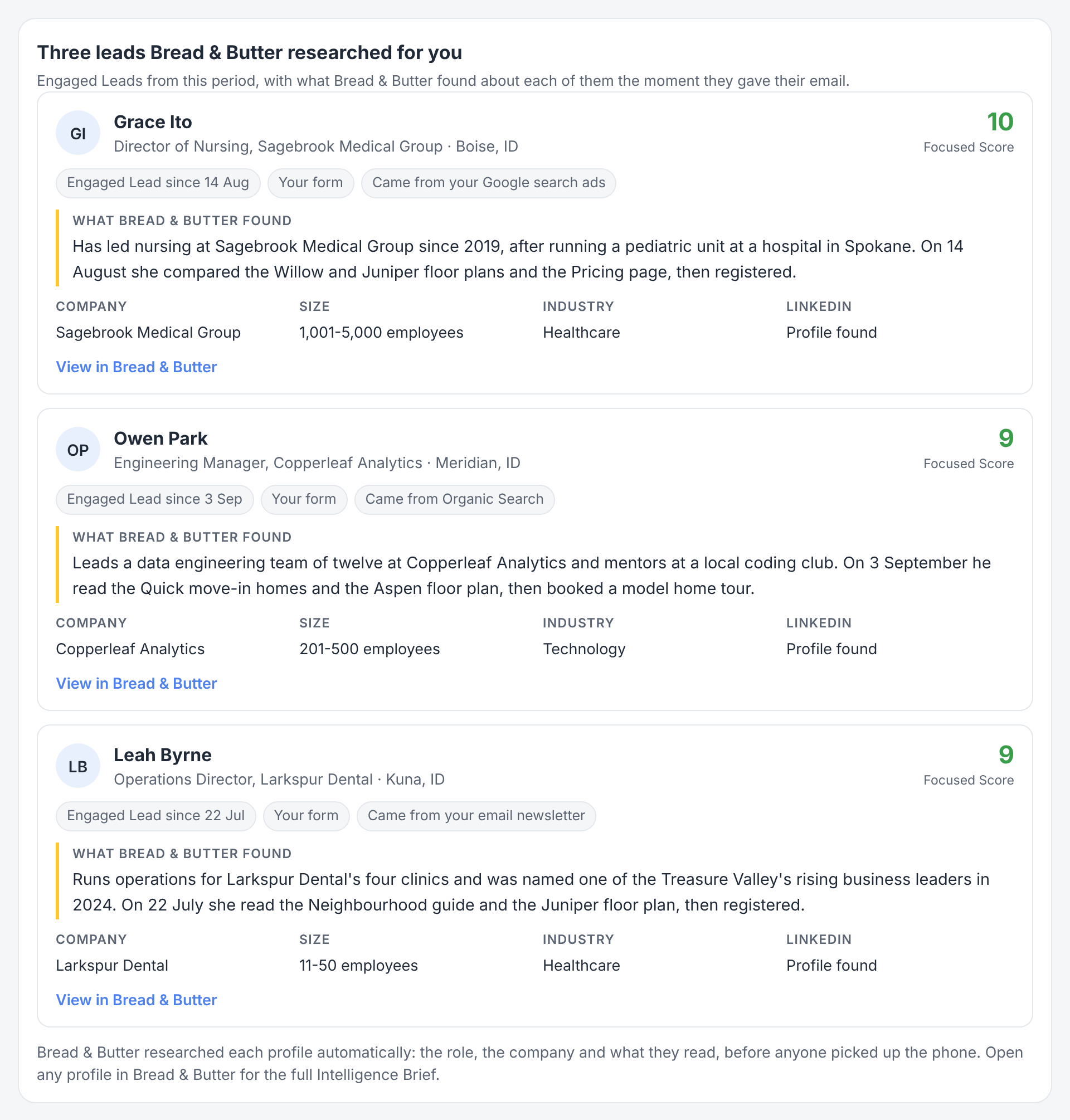
Three leads Bread & Butter researched for you. Three Engaged Leads from the period with the most complete research: name, role, company, city, Focused Score, how they raised their hand and what Bread & Butter found about them, each with a link to their profile. From Leads to follow up.
Channels. Paid visitors by channel, with the Focused visitors and Engaged Leads each one brought. From Ads Spend.
Top destinations, top five. The websites visitors clicked through to most. Only shown when your website has clicks to other websites. From Exit Destinations.
By assistant, and your llms.txt. The AI assistants sending people to your website, and the check on your llms.txt. From AI Assistants & GEO.
Bots kept out of your numbers. The visits from bots, crawlers and automated tools, removed from every figure in the report. From Old School Website Analytics.
Everyone named in the report links to their profile in Bread & Butter with View in Bread & Butter.
Why it opens with people
It's the one thing no other tool can show. Your analytics counts visits but can't tell you who made them. Your CRM knows who filled in a form, but not what they did on the website before or after. Bread & Butter records every visit, connects it to a person once they raise their hand, and researches them. A boss who reads "this person came back nine times to the same floor plan" understands what the website is doing in a way a chart of sessions never shows.
It reads in two minutes. The people and the four headline figures carry the page. The rest is there for whoever wants to go deeper.
It's positive and factual. The report says what grew and what worked, with real numbers from your account. The warnings and the things to fix live in the full reports, where the team can act on them.
How to run it
Connect your AI assistant to Bread & Butter first. See Bread & Butter MCP server connections.
Finding the reports. Once you're connected, the reports are ready to run straight away; there's nothing to download or set up. Ask your assistant "What Bread & Butter reports can I run?" and it lists the reports your role can run, with what each one is for. The Insights tab in Bread & Butter lists them too, each with a prompt you can copy.
More than one account. If your login gives you access to several Bread & Butter accounts, name the one you want. If you don't, your assistant asks which one before it runs anything.
Coming back later. The connection stays in place, so there's no code or key to remember. Open a new conversation, check that the Bread & Butter connector is switched on for it (in Claude, under the + button, then Connectors), and ask for the report by name. If the connection has lapsed, your assistant asks you to reconnect first.
Ask for the report by name, with a period:
- "Run the Bread & Butter Report for Your Boss for last month."
- "Run the Bread & Butter Report for Your Boss for the last 90 days, for my main website."
- "Run the Bread & Butter Report for Your Boss for Q3."
Your assistant gets the report from Bread & Butter, fills it with your account's data and shows it as a page. It's built from its own sections, so your assistant doesn't run the other reports to make it. Each run uses credits like any other question. See How do Credits work across storage, syncing, and profile enrichment?
A good rhythm is monthly. It sums up a month for the person who doesn't need the detail. To have it arrive on its own on the first of the month, see Run your Bread & Butter reports on a schedule.
Sharing it with your boss or your client
For your boss. Send it as it is, or open the monthly meeting with it. What's interesting gives the meeting its first five minutes; the four figures answer "is it working?"; each section names the full report to open next if a question comes up. Each section can be printed on its own, and printed copies leave out the prompts and the schedule box.
For an agency reporting to a client. Run it for each client's website on the first of the month and send it on top of the detailed reports. It is the page the client's owner reads; the full reports are for the client's marketing team.
Someone forwarded it to you? The box under the first card explains how to connect your own assistant and run it yourself.
Taking it further with your own questions
The report is a starting point. Ask your assistant about anything it shows. A few examples:
Go deeper on a person. "Show me everything Dana Whitlock read, visit by visit." "Who else from Northgable Realty has been on the website?"
Go deeper on a finding. "Which visitors opened the Aspen floor plan more than three times, and which of them registered?" "Show me everyone who came from an AI assistant this month."
Make it fit your boss. "Rewrite What's interesting in three bullet points for a board update." "Leave out the AI assistants section." "Translate the report into French."
Make it yours. Once a version works for you, ask your assistant to remember it, or save the prompt as a scheduled task so it arrives the same way every month.
Your assistant can only answer from the data your account has. When a section has nothing to show for the period, it's left out instead of guessing, and a new account with no data yet gets a short note at the top with what to set up first.
What it needs
Bread & Butter installed on your website. Data starts with the next visit. See How to Install Bread & Butter on Your Website
A way for visitors to raise their hand. People are named once they give a verified email address, through your own forms, a Bread & Butter conversion tool or social login. The more ways there are, the more of your visitors have a name. See How does Bread & Butter verify leads and enrich profiles?
Profile Enrichment, for who they are. The researched leads and the Who they are section use the research Bread & Butter does when an email address arrives. See What is Profile Enrichment, and what does it find?
Google Ads connected, for spend. The Channels section shows paid visitors from your ad links either way; spend and cost per lead appear once Google Ads is connected.
Related
- Bread & Butter MCP server connections
- Run your Bread & Butter reports on a schedule
- Attribution & Leads report
- Leads to follow up report
- The Intelligence Brief: Living Context in the Tools Your Team Already Uses
- What is Focused Score and how does it evaluate my traffic?
- How do Credits work across storage, syncing, and profile enrichment?