
Why send your GA4 key events from Bread & Butter instead of a tag on your website?
Who this is for: marketers and agencies who count leads in Google Analytics 4 and have noticed that GA4, the CRM and the ad platforms never agree.
What you'll learn: how key events are usually set up in GA4, where that setup goes wrong, and why sending the key event from Bread & Butter, when a real person reaches the step you care about, gives GA4 a number you can trust.
In GA4, a lead only counts once something tells Google it happened. The usual way is a piece of JavaScript on your website: a tag on the thank-you page, or a trigger in Google Tag Manager that fires when a form is sent. Bread & Butter does it differently. It follows every visit, knows when a real person reaches a step that matters to you, and sends the key event to GA4 itself, from our servers, on that same visitor.
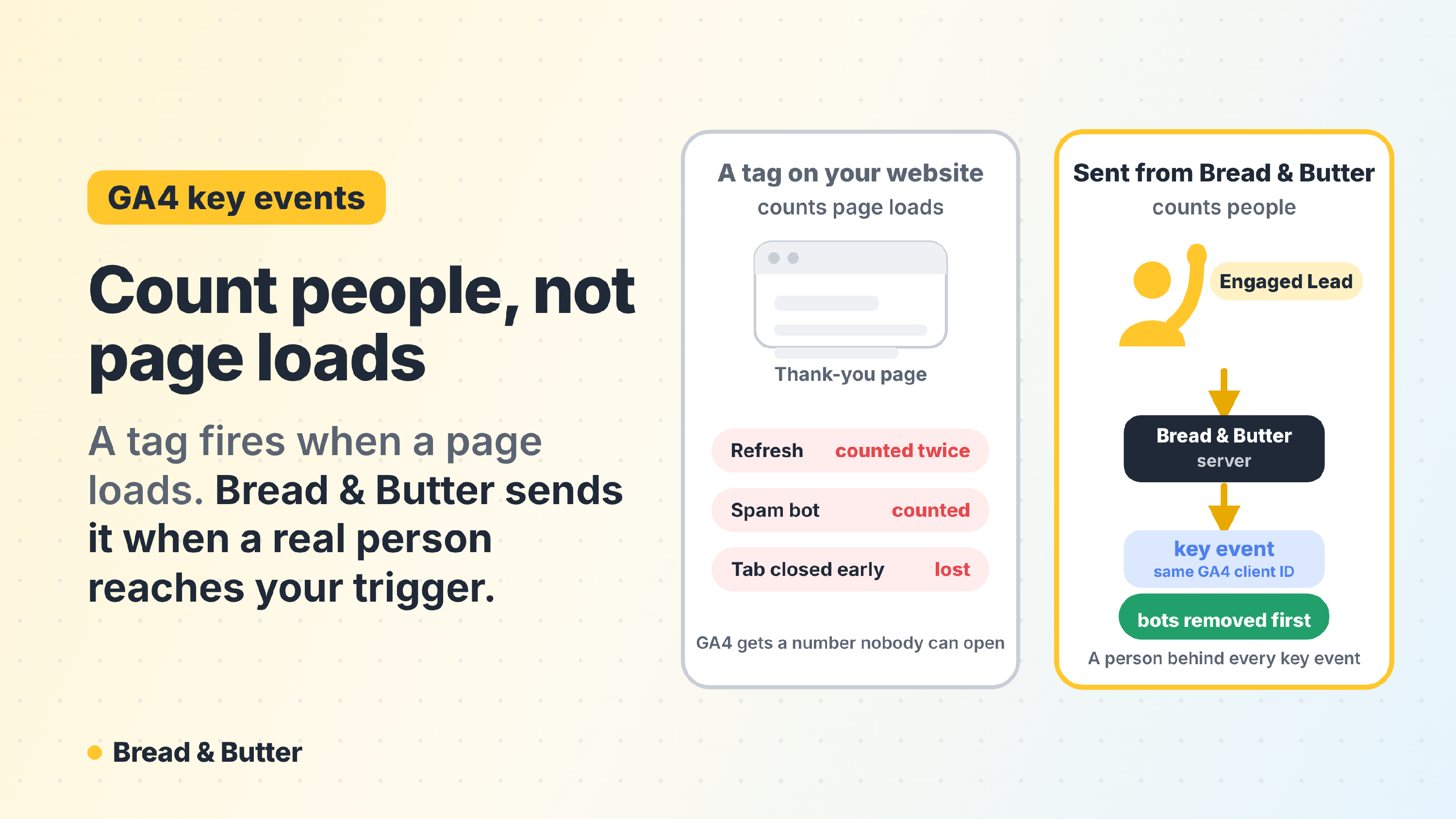
In short: a tag on your website counts page loads and button clicks. Refreshes and bookmarks count twice, failed forms count as leads, spam bots count as leads, and a visitor who closes the tab too soon isn't counted at all. Bread & Butter sends the key event from its servers when a visitor reaches your trigger (a lead stage such as Engaged Lead, or a funnel you've saved), with bots already removed, on the same visitor GA4 already knows through their GA4 client ID. There's nothing to add to your thank-you page and nothing to retest when the website changes, and every key event in GA4 matches a real person you can open in Bread & Butter.
How key events are usually set up
A key event in GA4 is an event you've marked as important, such as a lead. GA4 only knows it happened if something sends it. Most websites do that in the visitor's browser:
A thank-you page. The form sends the visitor to a confirmation page, and a tag on that page fires the key event every time it loads.
A form trigger in Google Tag Manager. A trigger listens for the form being sent, or for the click on the submit button, and fires the key event.
Custom JavaScript. A developer adds a line of code that fires the event when the form is sent.
All three run in the browser, on your website, and all three need someone to keep them working every time the website, the form or the cookie banner changes.
Where browser tags go wrong
They count page loads, not people. A thank-you page fires every time it loads. Refresh it, open it from a bookmark or come back to it from the browser history, and GA4 records another lead. Anyone who finds the address can trigger it without filling in anything.
They fire too early. A trigger on the submit button counts the click, even when the form then fails and nothing is sent. The lead never happened, but GA4 counted it.
They count bots. Spam bots fill in forms all day. Each submission fires the key event like any other, and GA4 can't tell a spam submission from a real one. If Google Ads learns from those key events, Smart Bidding goes looking for more traffic like the bots.
They get cut off. A tag has a fraction of a second to send once the form is submitted. A visitor who closes the tab or moves on before it finishes is a lead that happened and was never counted.
They break quietly. Forms embedded from another service, single-page websites, new form plugins and redesigns all change what the tag sees. Nobody gets an alert when a conversion tag stops firing; the number just drops.
They don't know who the lead is. A key event fired in the browser says "a form was sent". It can't tell you whether that person had visited ten times before, what they read, or whether they became a customer.
How Bread & Butter sends the key event
From our servers, not the browser. When a visitor reaches your trigger, Bread & Butter sends the key event to GA4 directly, through Google's Measurement Protocol. Closing the tab doesn't stop it, and there's no tag on the page to break.
On something that really happened. You choose the trigger: a lead stage, such as Engaged Lead, or a funnel you've saved. A funnel can be as simple as one user journey event (a download, a booking, a click to a partner) or as specific as Focused visitors from paid search who viewed your pricing page. The key event goes out when the visitor reaches it, not when a page loads or a button is clicked, so a refresh or a second visit to the thank-you page doesn't send it again.
Bots already removed. Bread & Butter filters bots and spam submissions before anything reaches your triggers, so the key events in GA4 are people.
On the same visitor GA4 knows. Your website's Google tag gives each visitor a GA4 client ID. Bread & Butter picks it up automatically and sends it with the key event, so GA4 records the key event on that visitor, next to everything else it knows about them.
Tied to a real profile. Every key event in GA4 has a person behind it in Bread & Butter: their visits, what they read, their Focused Score and, once they give it, who they are. When GA4 says you had 40 leads last month, you can open all 40.
Nothing to maintain on the website. No tag on the thank-you page, no trigger in Tag Manager to retest after a redesign. If you change what counts as a lead, you change the trigger in Bread & Butter and GA4 follows.
Browser tag or Bread & Butter, side by side
|
|
Tag on the website | Sent from Bread & Butter |
|---|---|---|
| What it counts | Page loads and clicks | A real visitor reaching your trigger |
| Refreshing the thank-you page | Counted again | Not sent again |
| Form that fails | Often counted | Not sent |
| Spam bots | Counted as leads | Removed first |
| Visitor closes the tab early | Often lost | Not affected |
| Website redesign or new form | Needs retesting | Nothing to change |
| Who the lead is | Unknown | One click away in Bread & Butter |
Good to know
GA4 needs to know the visitor. The key event is sent on the visitor's GA4 client ID, so it goes out for visitors your Google tag has seen. A visitor who blocks Google Analytics completely has no GA4 record for any method to add a key event to; they're still in Bread & Butter, with their whole journey.
A lead can be sent again. The key event is sent each time a visitor enters your trigger. If someone leaves a lead stage and is moved back into it, GA4 receives it again, so set the trigger on a stage leads only move forward from.
What GA4 receives. The key event, the visitor's GA4 client ID, and the page and referrer of their visit. Google doesn't allow names, email addresses or other personal details in GA4, so Bread & Butter never sends them; the person behind each key event stays in Bread & Butter.
What you still need on your website
The Google tag. GA4 still runs on your website as it does today; it's what gives each visitor the client ID Bread & Butter sends back. If GA4 already collects page views on your website, there's nothing to add.
Bread & Butter installed. See How to Install Bread & Butter on Your Website.
You can keep your existing conversion tags while you compare. Give the Bread & Butter key event its own name, such as breadbutter_engaged_lead , so the two counts sit side by side, then switch your reporting and bidding to the one you trust.
Set it up
The integration takes a few minutes: your GA4 Measurement ID, a Measurement Protocol API secret and the name of the key event. See Google Analytics (GA4).
Related
- Google Analytics (GA4)
- Why is a Focused visitor more accurate than Google Analytics' engagement rate?
- What are User Events, and how do I use them?
- Integrations and Automation: what you can send, where, and when
- Bots & AI Crawlers report