
Bots & AI Crawlers report
Who this is for: marketers and website owners who want to know who reads their website besides people, and digital agencies who report on a client's AI search visibility.
What you'll learn: what the Bots & AI Crawlers report shows, why an AI crawler that stops coming matters, how to read the numbers, how to run the report in your AI assistant, and what to do with what it finds.
Every other Bread & Butter report leaves bots out, so your numbers count people only. The bots don't disappear, though. Some of them are good for you: search engines, and the AI crawlers that read your pages so ChatGPT, Claude and Perplexity can quote you. Others are scrapers copying your prices. The Bots & AI Crawlers report is the one place they're all counted, so you can see which ones you want, which ones you don't, and which good ones have stopped coming.
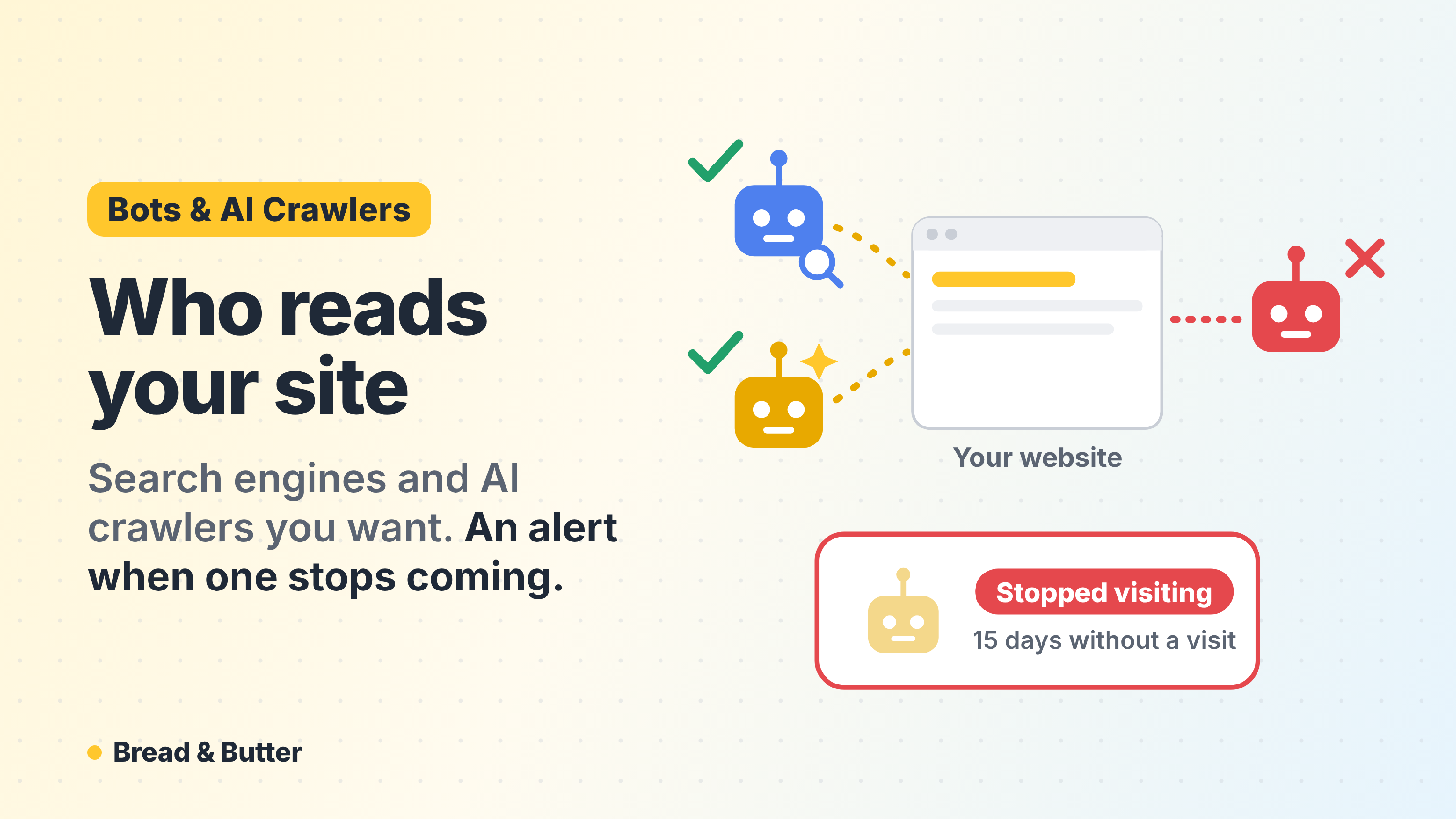
In short: The Bots & AI Crawlers report is a ready-made report your AI assistant builds from your Bread & Butter data, best run monthly. It counts every bot that reached your website and splits the ones you want (search engines, AI crawlers and AI assistants fetching a page for someone) from the ones you don't (scrapers, SEO tools and unnamed bots). For each AI crawler it shows how often it came, what it read and whether it's still coming: an AI crawler that stops visiting is the alert, because that assistant stops learning what your website says. It ends with plain steps for your robots.txt, your llms.txt and your firewall. Every card explains what the chart says, why it matters and what to keep an eye on, and ends with a question to ask next. Owners, Administrators and Marketers can run it.
What the report answers
Are AI assistants reading my website? Which AI crawlers came, how often, and which pages they read, so you know what ChatGPT, Claude, Perplexity and the others can quote you on.
Has one of them stopped coming? A crawler that came regularly and then stopped is marked Stopped visiting. One that's coming less often is marked Slowing. Both usually mean something changed on your website, such as your robots.txt or your firewall.
How much of my traffic is bots? Bot visits against human visits, so you know what every other report leaves out.
Is anyone scraping my website? Scrapers, SEO tools and unnamed bots, the days they spiked and the pages they hit hardest.
What's in it
The report opens with the month at a glance: four figures against the period before. AI crawler visits, with the AI assistant fetches beside them; search engine visits; unwanted bots; and the bot share of all visits. A short paragraph says whether any good crawler stopped, what stands out, and the one thing holding the website back.
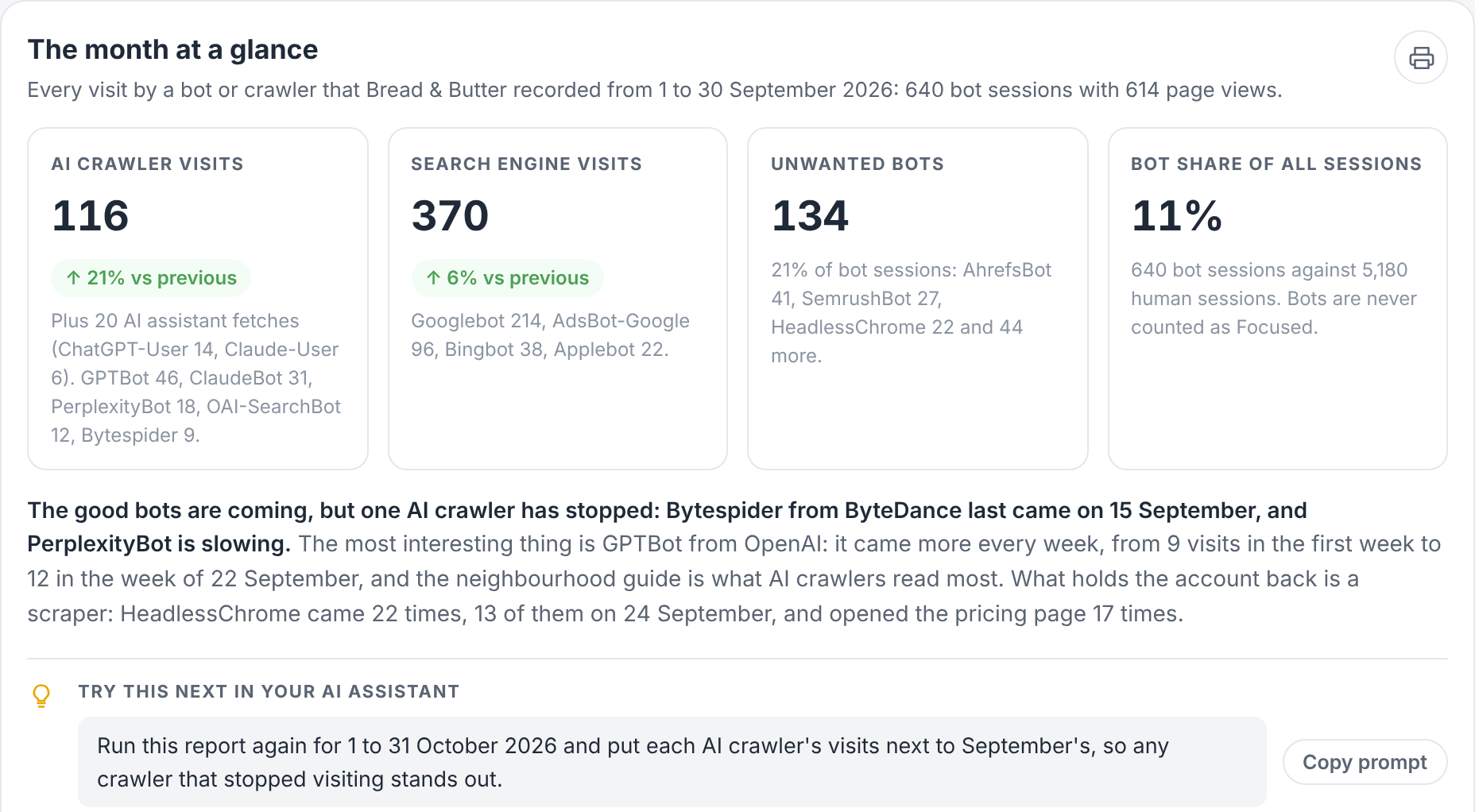
Then come the cards, each one on its own:
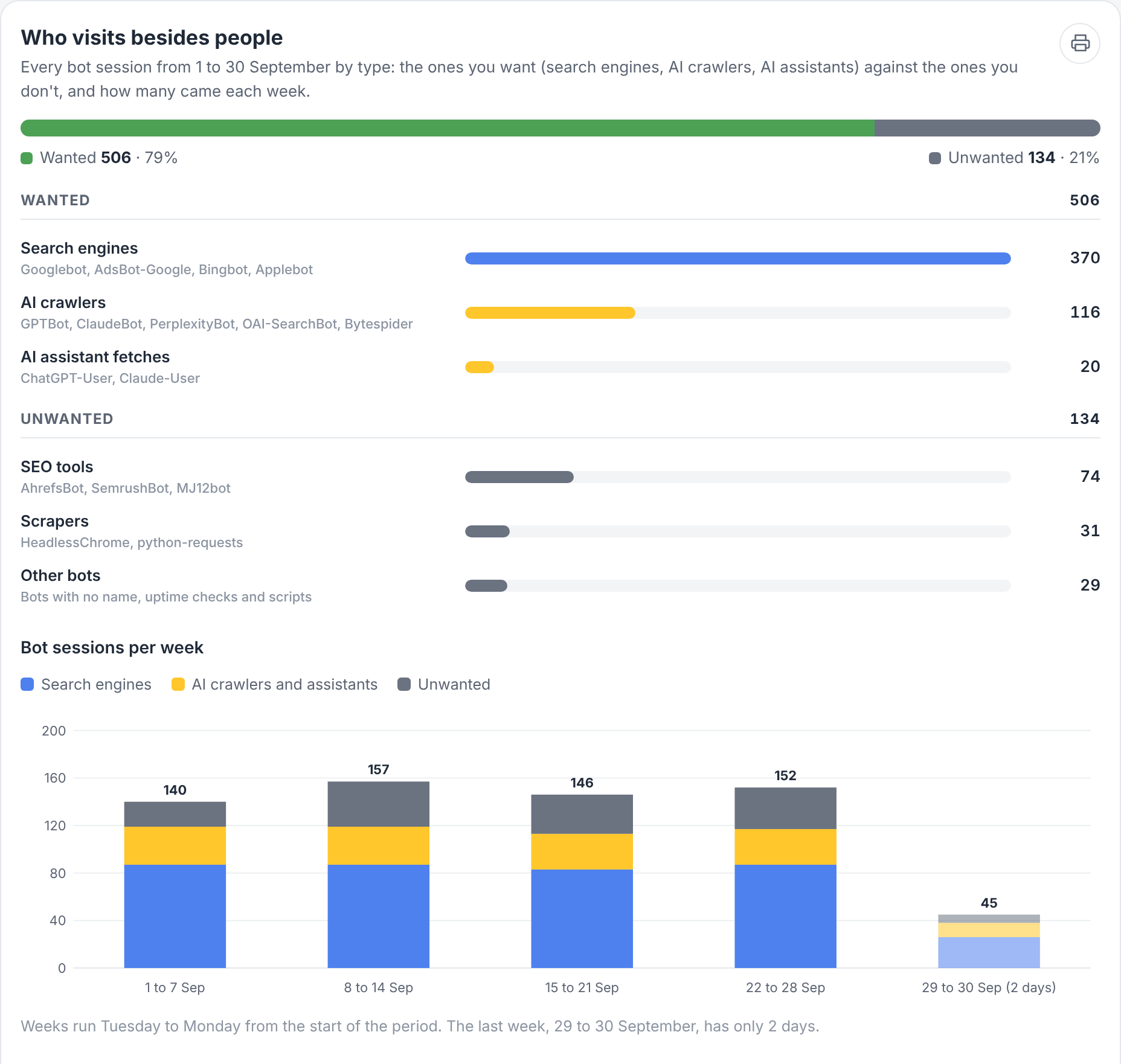
Who visits besides people. Every bot visit by type: the ones you want against the ones you don't, then each type on its own, then visits per week.
AI crawlers and AI assistants. One row per AI crawler or AI assistant, with the company behind it (GPTBot · OpenAI, ClaudeBot · Anthropic), its visits, the pages it read, its first and last visit, its visits per week and its status:
- Visiting: still coming.
- Slowing: its visits in the last 14 days are under half its visits in the first 14.
- Stopped visiting: it came in at least 2 of the first 3 weeks, then nothing for more than 14 days.
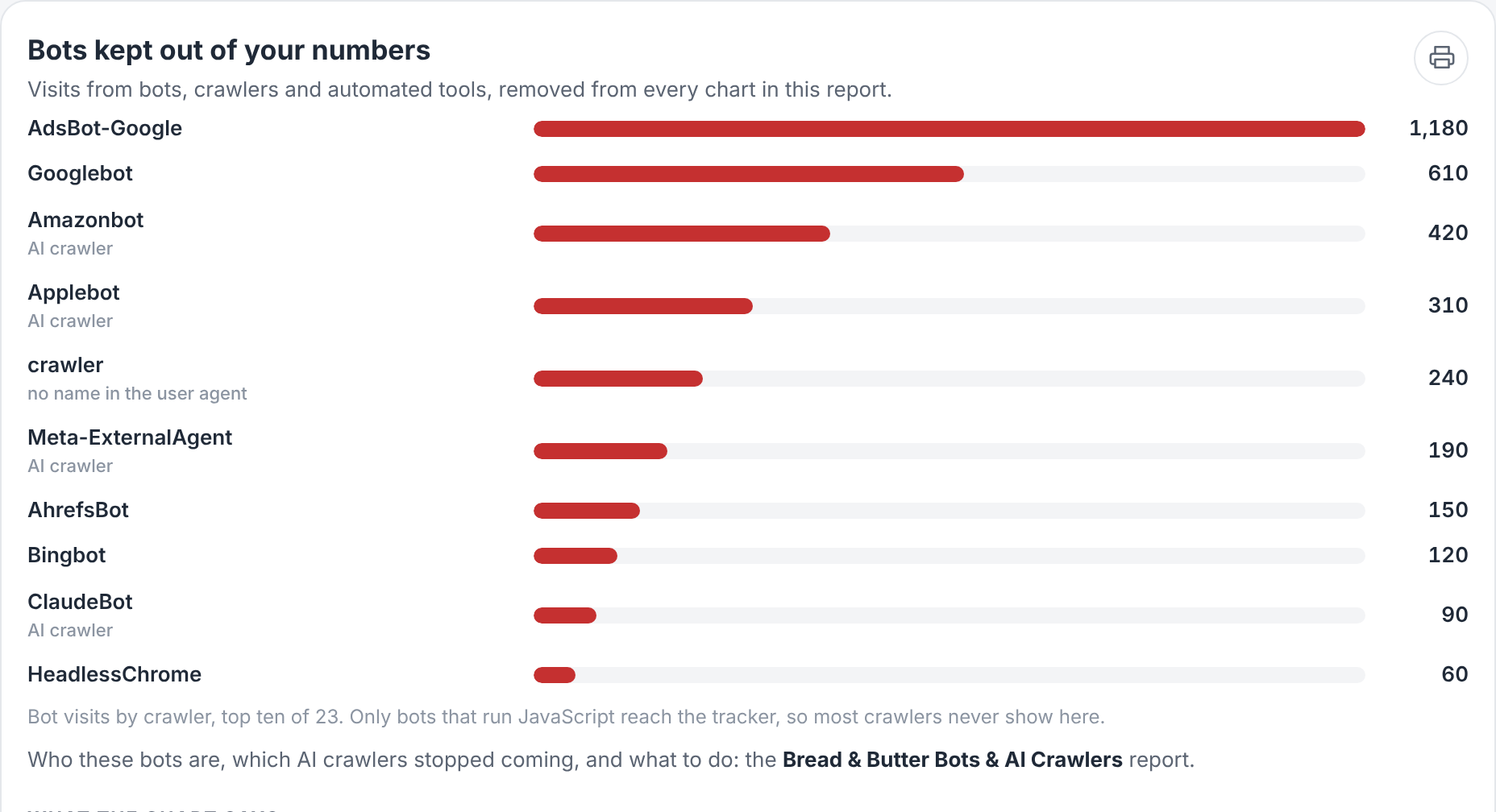
A sample report for a fictional business. Your report uses your own website's bots and pages.
What AI crawlers read. The pages AI crawlers and AI assistants read, with how many times each crawler read them. What AI assistants then send people to is in the AI Assistants & GEO report.
Search engines. Each search engine crawler, such as Googlebot, Bingbot and Applebot, with its visits and pages. AdsBot-Google is the one that checks the pages your Google ads link to.
Scrapers, SEO tools and unnamed bots. The visits that aren't search engines or AI crawlers: who they are, the days they spiked and the pages they hit.
Bots on your ads. Bot visits that arrived from a Google Ads click. Those visits are also part of the wasted budget in the Ads Spend report.
What to do. Plain steps for your website: keep search engines and AI crawlers allowed in your robots.txt, add an llms.txt, block scrapers only if they hit your pricing or content pages hard, and never block Googlebot, AdsBot-Google or the AI crawlers you want.
Under every card are three short sections: What the chart says, the three findings that matter; Why it matters, in a sentence or two; and What to keep an eye on, the figures to watch next time and the level at which each one needs a look.
Every bot is named with the company behind it, such as Googlebot · Google, ClaudeBot · Anthropic or AhrefsBot · Ahrefs. When a card has nothing to show, it says what's missing instead of guessing.
How to read the numbers
The real numbers are higher. Bread & Butter records a visit when the page runs its JavaScript. Many AI crawlers and most AI assistants fetch pages without running it, so their real visits are higher than the report shows. Read every crawler figure as a floor, not a total.
A crawler that stops is the alert, not one that's low. A crawler that visits a few times a week is normal. What matters is a change: a crawler that was coming and isn't any more.
Bots never count as visitors. Every other report, and your dashboard, leaves them out of every number. This report is the only place they're counted, so the figures here never change your visitor, Focused or Engaged Lead numbers.
How to run it
Connect your AI assistant to Bread & Butter first. See Bread & Butter MCP server connections.
Finding the reports. Once you're connected, the reports are ready to run straight away; there's nothing to download or set up. Ask your assistant "What Bread & Butter reports can I run?" and it lists the reports your role can run, with what each one is for.
More than one account. If you can reach several Bread & Butter accounts, name the one you want. If you don't, your assistant asks which one before it runs anything.
Ask for the report by name, with a period:
- "Run my Bread & Butter Bots & AI Crawlers report for last month."
- "Run my Bread & Butter Bots & AI Crawlers report for last month, for my main website."
- "Run my Bread & Butter Bots & AI Crawlers report for last month and compare each AI crawler with the month before."
Your assistant gets the report from Bread & Butter, fills it with your account's data and shows it as a page. Each run uses credits like any other question. See How do Credits work across storage, syncing, and profile enrichment?
A good rhythm is monthly, on the first of the month. A crawler that stops coming shows up within two weeks, and a month shows it clearly. To have it arrive on its own, see Run your Bread & Butter reports on a schedule.
Sharing it with your team or your client
For a marketing team. The first card is the summary. The AI crawlers card is the one to check every month: anything marked Stopped visiting or Slowing goes to whoever manages the website.
For an agency reporting to a client. Run it for each client's website on the first of the month, next to the AI Assistants & GEO report. Together they show who reads the website for AI assistants and who those assistants send. Each card can be printed on its own, and printed copies leave out the prompts and the schedule box.
For whoever manages the website. The What to do card is written for them: robots.txt, llms.txt and the firewall, in plain steps.
Taking it further with your own questions
Every card ends with Try this next in your AI assistant, a question chosen from that card's most important finding, with a button to copy it. Ask it, or ask your own. A few examples:
- "Show every AI crawler's visits week by week since June, with the Stopped visiting and Slowing flags."
- "List the pages AI crawlers read since June, and mark the ones that aren't in my llms.txt."
- "Show bot visits day by day last month next to human visits, with the bot share for each day."
- "Write an llms.txt for my website from the pages AI crawlers read most."
What it needs
Bread & Butter installed on your website. Data starts with the next visit, from people and from bots. See How to Install Bread & Butter on Your Website.
Nothing else. Bread & Butter's bot filter records bots on its own. For the Bots on your ads card, connect Google Ads. See Connect Google Ads.