
Intelligence Brief report
Who this is for: salespeople getting ready for a call, and marketers who want to understand one lead before they decide what to send them.
What you'll learn: what the Intelligence Brief report shows, how it differs from the Intelligence Brief that goes to your CRM, how to run it in your AI assistant, and what to do with it.
The Intelligence Brief that lands in your CRM is written to be read in ten seconds. Sometimes you want a little more: before a first call, before a meeting with a buyer who has been reading your website for months, or when a lead comes back after a long time away. The Intelligence Brief report gives you what Bread & Butter knows about one person, on one page, whenever you ask.
In short: The Intelligence Brief report is a ready-made report your AI assistant builds for one person. Name a lead by name, email address, company or profile link, and your assistant builds their Intelligence Brief as one report: who they are, what's interesting about them right now, their journey and last three visits, three ways to open the conversation, their profile, a short summary of their company, where they browse from, and what Bread & Butter has drafted and sent them. Run it before a call, forward it to a colleague, or ask your assistant to run it every time a lead you're working comes back. Owners, Administrators, Marketers and Sales can run it.
What the report answers
Who is this, and why do they matter now? The report opens with who they are and the one thing most worth knowing about them today.
What have they been looking at? Their journey in a paragraph, and their last three visits page by page, with how long they stayed.
How did they find us? Their first and latest visits, the source, campaign and keyword that brought them, and with your ads account connected, what their click cost against what a Focused visitor costs.
What do I say first? Three openers written from the research: an icebreaker, a live talking point and a sales trigger, each with its source.
What's in it
The report follows the Intelligence Brief tab of the profile page in Bread & Butter, one card for each part:
The lead. Name, role, company and location, their email address and LinkedIn profile, their Focused Score and how it has moved, their lead stage, how many times they've visited, when they became an Engaged Lead, and their first and latest visits.
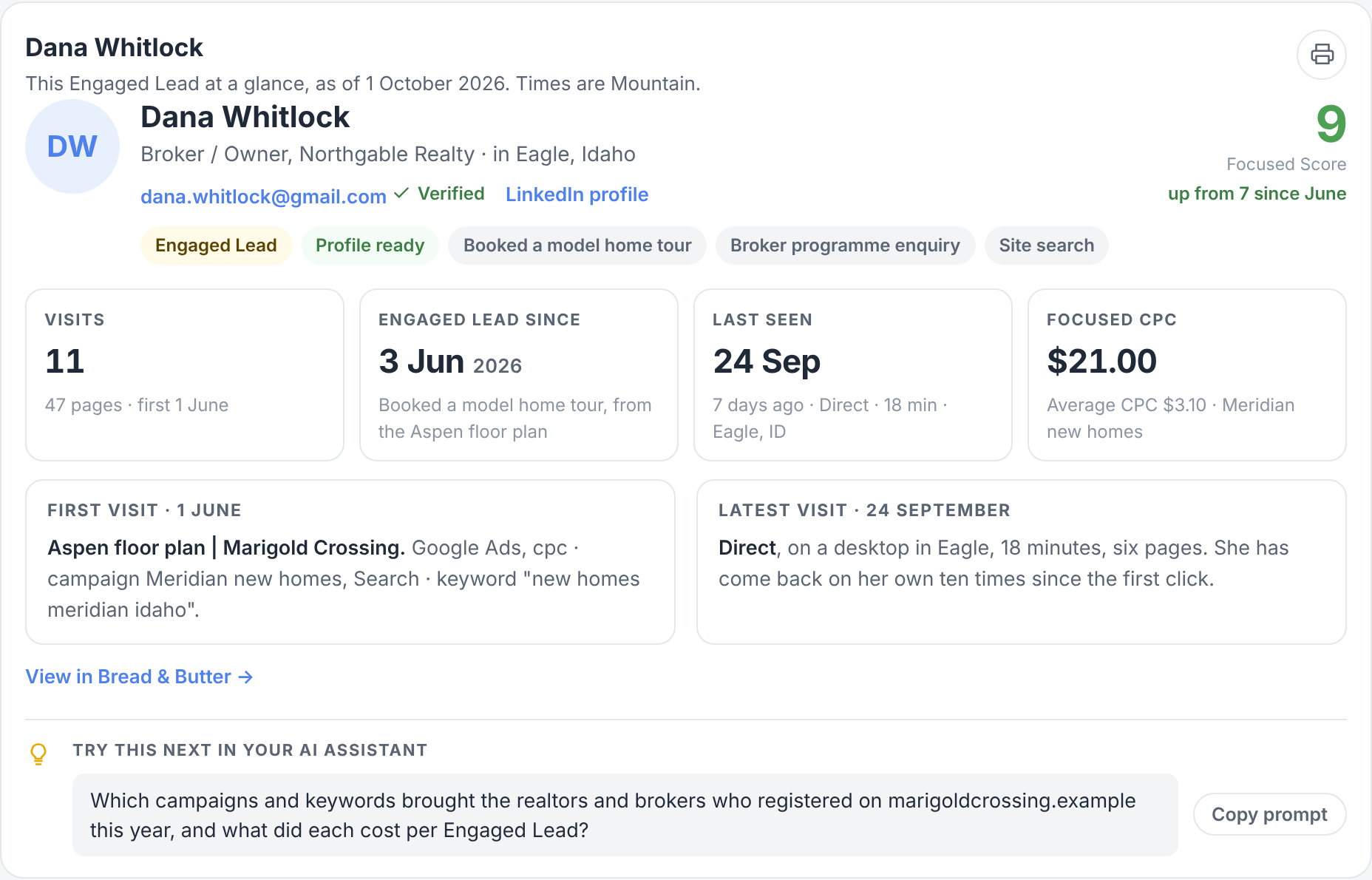
What's interesting. One bold headline and a sentence or two on the single most useful thing to know about this person right now: how they fit what you sell, something new at their company, other people from their company on your website, or a change in what they keep coming back to. It is rewritten every time they come back. When there is nothing worth saying yet, the card is left out. The same words open the Intelligence Brief in your CRM, Slack and email. See The Intelligence Brief.
The Brief. Their user journey in a paragraph, with its topics, their last three visits page by page, and the three outreach starters: an icebreaker, a live talking point and a sales trigger.
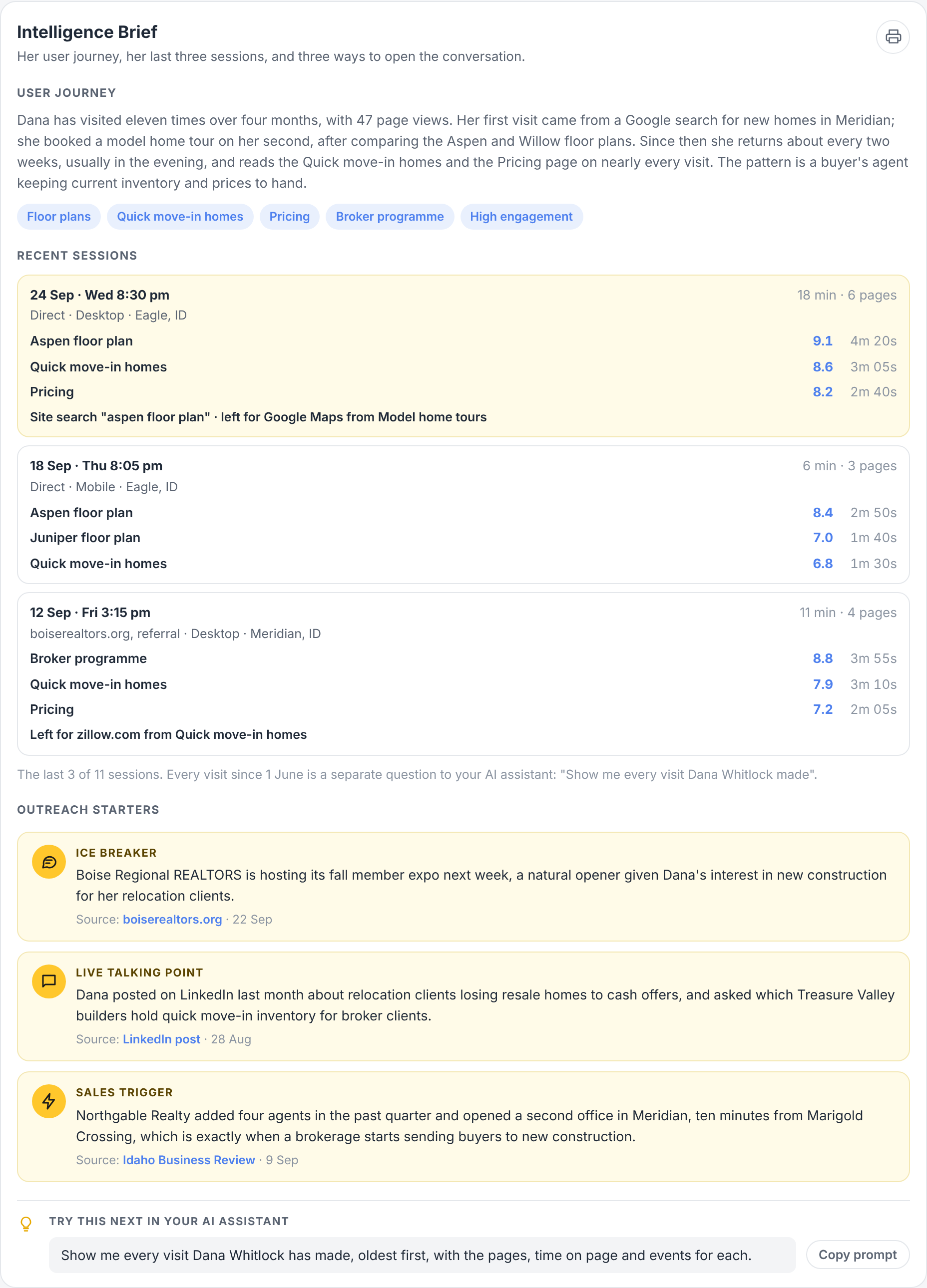
A sample report for a fictional lead. Your report uses your own lead's profile.
Profile. Their role, seniority and department, a summary of who they are, and their career, with their LinkedIn profile when it was found.
Company summary. What their company does, its industry, size and location, in a few lines. For everything about the company, run the Company Intelligence report. See [Company Intelligence report]([LINK: Company Intelligence report article]).
Location. Where they browse from, by city, on a map, with their time zone and the times of day they visit, so you know when to call.
Nurture. The current draft, ready to review and send in Bread & Butter, and the emails already sent to them.
Every card ends with Try this next in your AI assistant, a question chosen from what that card shows, with a button to copy it.
Every visit, when you need it
The report is a summary, so it shows the last three visits. To see every visit, every event and every click out to another website, ask your assistant for it on its own, for example "Show me every visit Dana Whitlock has made, oldest first, with the pages, time on page and events for each." It's a separate question because it returns much more, and it uses more credits.
How it differs from the Intelligence Brief in your CRM
The Brief in your CRM is a summary that arrives on its own when a lead raises their hand and every time they come back, in the fields next to your rep's compose window.
The Intelligence Brief report is the same Brief, with more of the profile around it, on demand, for any lead you name. It's laid out to read, print or forward.
The two always agree: the report uses only what Bread & Butter holds about the person, and never adds research the profile doesn't have.
How to run it
Connect your AI assistant to Bread & Butter first. See Bread & Butter MCP server connections.
Ask for it with the person's name, email address, company or profile link:
- "Run my Bread & Butter Intelligence Brief for Dana Whitlock."
- "Run my Bread & Butter Intelligence Brief for the lead from Northgable Realty."
- "Tell me more about the lead who came back this morning."
If more than one person matches, your assistant shows you a short list (name, company, last visit) and asks which one before it builds anything.
It's about one person, so it's never part of "Run all my Bread & Butter reports" or the Reports email.
More than one account. If you can reach several Bread & Butter accounts, name the one you want. If you don't, your assistant asks which one first.
When a lead comes back. Ask your assistant to run it every time a lead you're working comes back, or every Monday for the leads on your call list. See Run your Bread & Butter reports on a schedule.
Each run uses credits. See How do Credits work across storage, syncing, and profile enrichment?
Sharing it
Before a call. Read the What's interesting card and the outreach starters. They're written to be read in a minute.
With a colleague. Forward the report to the person taking the meeting. Each card can be printed on its own, and printed copies leave out the prompts and the schedule box.
With your manager. Run it for the three leads you're working hardest, so the conversation is about the people, not the numbers.
Privacy
The report holds personal information about one person, so it follows the same rules as the profile page in Bread & Butter. You only get it for people you could open in Bread & Butter, never for anyone removed through the Privacy Manager, and never with an IP address: it shows the city and region instead. Accounting users can't run it. Your AI assistant's own terms apply to what it keeps from the conversation.
What it needs
Bread & Butter installed on your website, and a lead who has left their details. The research cards fill in once Profile Enrichment has researched the person. See What is Profile Enrichment, and what does it find?