
How Bread & Butter helps you with privacy and consent
Privacy laws ask two things of every website: tell people what you collect and why, and respect the choices they make. Bread & Butter is built to make both easier. This article explains what Bread & Butter does on its side, how it follows your visitors' choices, the tools it gives you, and the parts that stay with you.
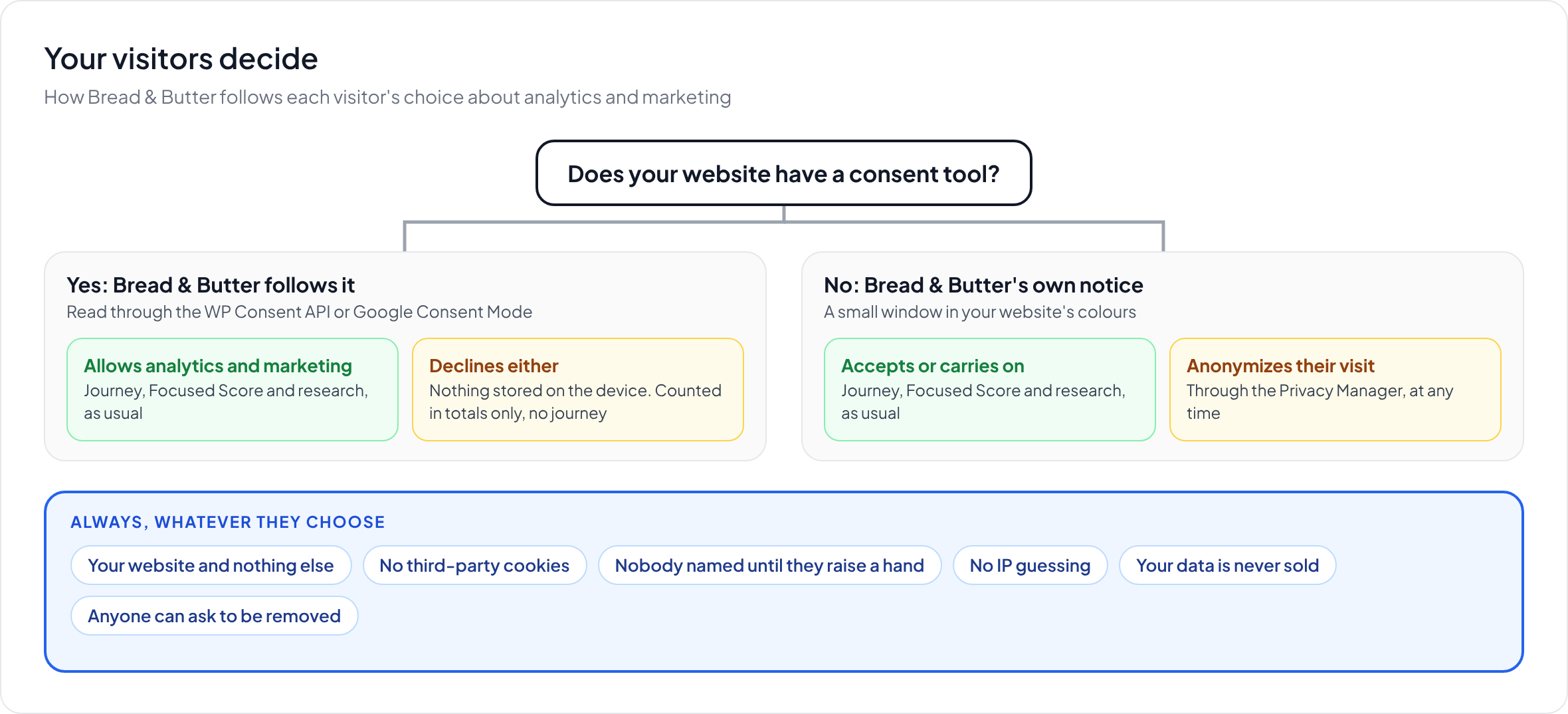
In short: Bread & Butter records what happens on your own website and nothing else, uses no third-party cookies, names nobody until they raise a hand, and never sells your data. It follows the choice visitors make in your consent tool, through the WP Consent API on WordPress or Google Consent Mode on any website. If you don't have a consent tool, its own notice tells visitors what you use and lets them anonymize their visit at any time. The Privacy Manager gives visitors a way to ask for their information to be removed, and your Terms and Privacy Policy are shown wherever they raise a hand. Bread & Butter helps you meet your obligations, but it doesn't make your website compliant on its own: your privacy policy, your consent setup and what happens in your other systems are yours to get right. This isn't legal advice, so check your setup with your legal team.
What Bread & Butter does on its side
These are choices built into the product, not settings you have to remember.
- Your website, and nothing else. Bread & Butter records what visitors do on your website. It doesn't follow them across the web or watch what they do on other websites.
- No third-party cookies. Whichever way you install it, Bread & Butter doesn't use third-party cookies. With the WordPress plugin, the whole path is first-party: the visitor's browser only ever talks to your website.
- Nobody is named until they raise a hand. Until someone fills in a form, subscribes, buys or continues with an account they already have, they're a journey and a Focused Score, not a name. Bread & Butter never guesses who someone is from their IP address, and doesn't buy data to work out who your visitors are.
- Your data is yours. The journeys recorded on your website belong to you, and Bread & Butter doesn't sell them.
See Server-Side vs. Browser-Side Tracking: The Reliability and Ethics of Bread & Butter and Who owns the data I collect, and do you resell it?
Following your visitors' choices
If your website has a consent tool, such as Complianz, CookieYes, Cookiebot or OneTrust, Bread & Butter reads the choice the visitor made there and follows it. Bread & Butter counts as both analytics and marketing.
- On WordPress, through the WP Consent API, checking the statistics and marketing categories.
- On any website, through Google Consent Mode, checking analytics_storage and ad_storage.
A visitor who allows both is tracked as usual. A visitor who declines either has nothing stored on their device. They're still counted in your All Traffic totals, with bots taken out, but they have no journey, no Focused Score, and no research if they later raise a hand. If they change their mind, Bread & Butter follows the new choice from that moment. When a consent tool is found, Bread & Butter's own notice stays hidden, so visitors never see two banners.
If your website has no consent tool, you can turn on Bread & Butter's own notice: a small window at the bottom of the page that explains you use analytics and marketing tools, links to your Privacy Policy and Terms, and lets visitors anonymize their visit at any time. See Cookie Consent.
Which approach fits where your visitors are
Bread & Butter's own notice works on implied consent: carrying on counts as agreeing. That's common in places such as the United States and Canada. In other places, such as the European Union and the United Kingdom, the rules generally expect visitors to actively opt in before analytics and marketing tools are used. If many of your visitors are there, use a consent tool that asks first, and Bread & Butter will follow it.
People's right to be removed
Privacy laws give people the right to ask for their personal information to be removed. The Privacy Manager gives your visitors a self-serve way to do that, from a link, a button, your privacy policy or the "anonymize your visit" link in Bread & Butter's notice.
- A visitor who hasn't raised a hand has their journey stopped on that device straight away.
- A visitor who has confirms it's really them with a PIN sent to their email address, and the request comes to you to approve. Once you approve, their details are disconnected from their journey, so your reports stay accurate without that person attached.
- Your other systems can be told. Bread & Butter can notify your systems by API when a request is made, so copies in your CRM or data warehouse can be dealt with too.
Requests wait for your approval, and removal requests carry legal deadlines, so make reviewing them part of someone's routine.
Telling people what you do
- Your links, where people act. The Terms and Privacy Policy you add under Settings, then Legal & Compliance Links, are shown on Bread & Butter's notice and on the conversion tools, at the moment visitors raise a hand. See Configuring your Legal and Compliance Links.
- Real people, real replies. Bread & Butter drafts emails, but a person on your team reviews and sends every one.
What stays with you
Bread & Butter helps you meet your obligations. It can't meet them for you, because they depend on everything your business does, not just one tool.
- Your privacy policy should say that you use Bread & Butter for analytics and marketing, what it collects and why.
- Your consent setup should fit the places your visitors are. Choose between a consent tool and Bread & Butter's own notice with that in mind.
- Removal requests need someone to approve them on time.
- Copies outside Bread & Butter, in your CRM, data warehouse or email tools, are yours to update when someone asks to be removed.
- Your outreach should follow the email and privacy laws where you sell, especially when contacting people who haven't asked to hear from you.
Privacy law varies by country and changes often, and this article isn't legal advice. Check your setup with your legal team or compliance officer.
Related
- Cookie Consent
- Privacy Manager: how visitors can remove their personal information
- Server-Side vs. Browser-Side Tracking: The Reliability and Ethics of Bread & Butter
- Who owns the data I collect, and do you resell it?
- How is Bread & Butter different from "visitor identification" tools that track people without consent?
- Configuring your Legal and Compliance Links