
Privacy Manager: how visitors can remove their personal information
Privacy regulations give people the right to ask that their personal information be removed, and they expect you to act on that request quickly. The Privacy Manager gives your visitors a secure, self-serve way to make that request, and gives you a controlled way to act on it, without your legal team handling each one by hand.
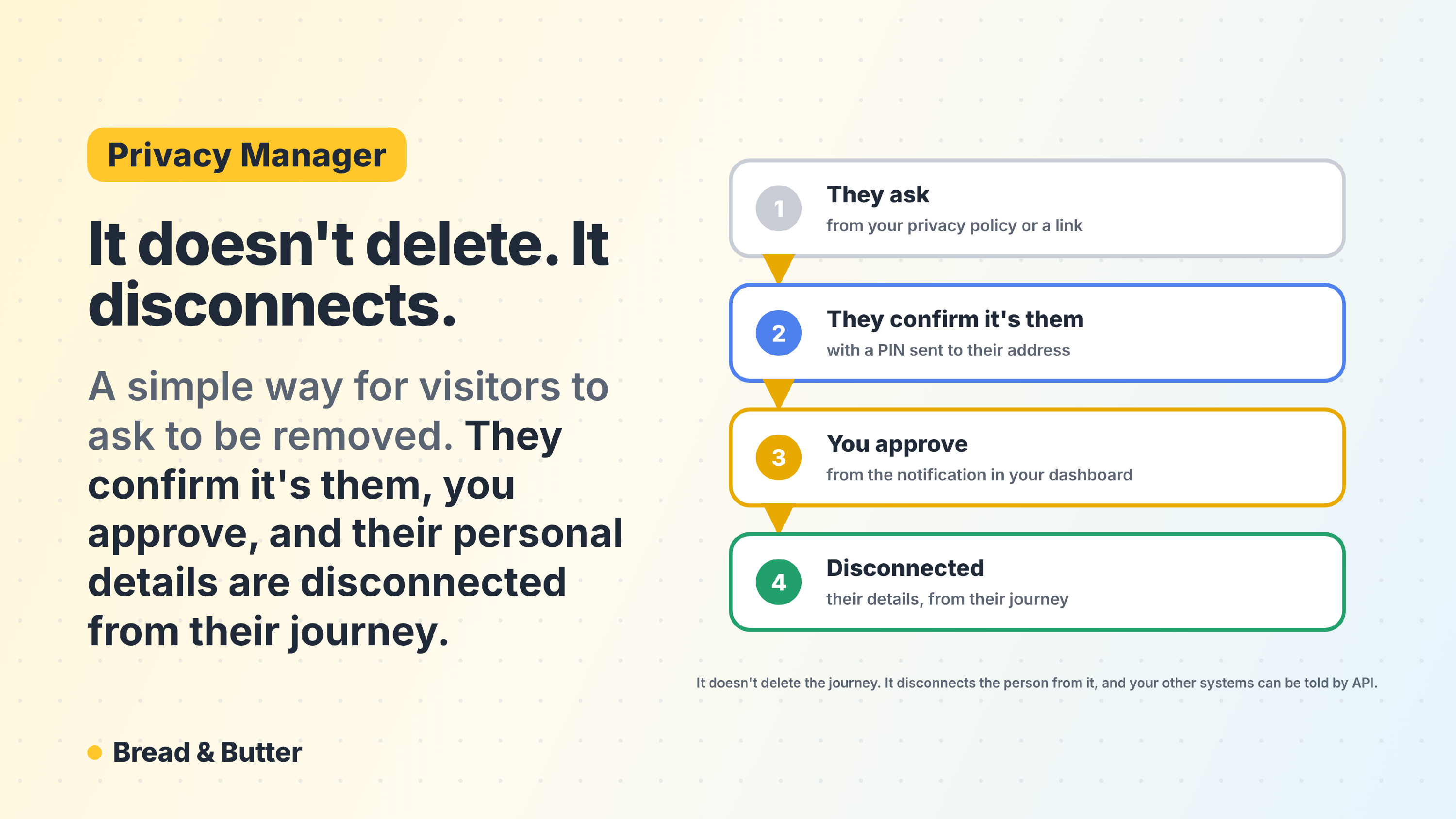
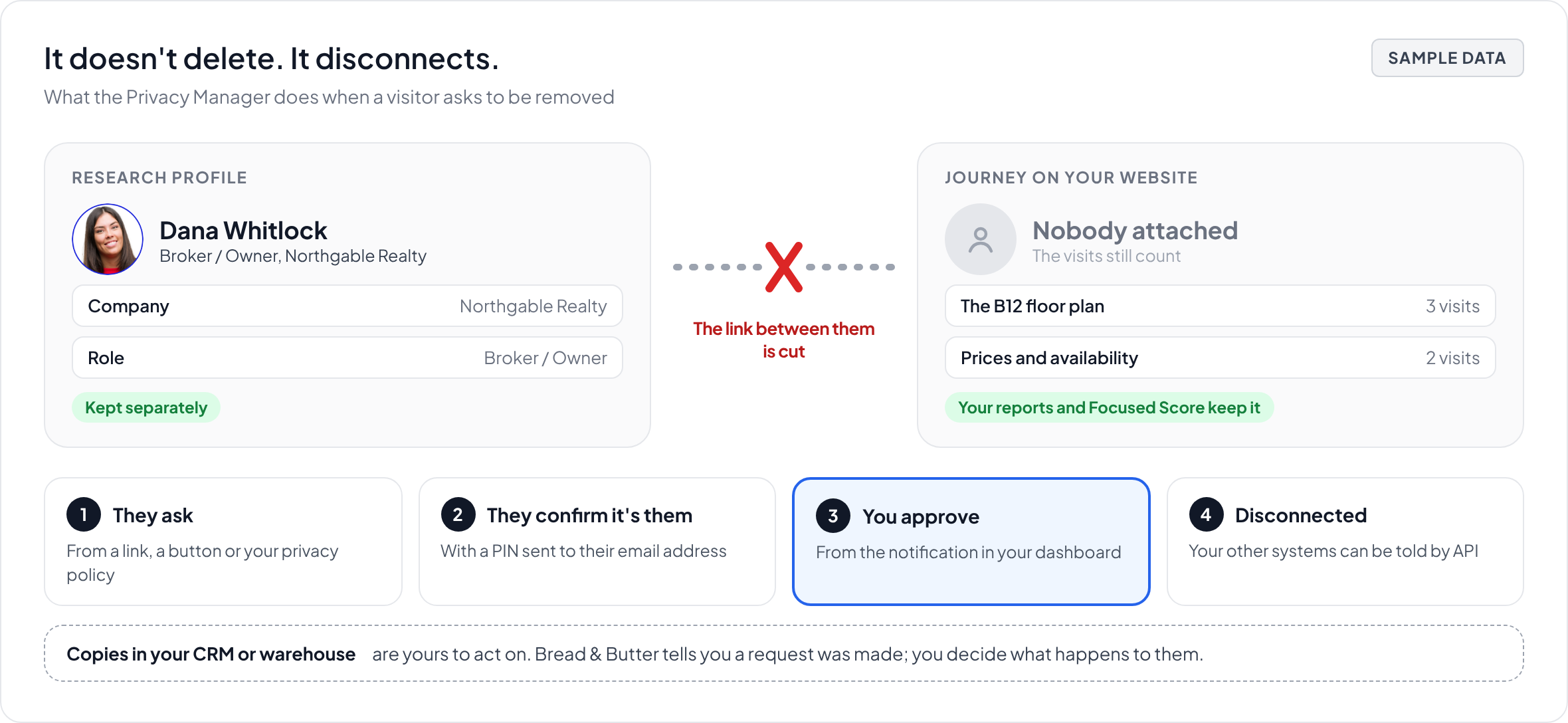
In short: The Privacy Manager does not delete, it disconnects. A visitor confirms it's really them and asks to be removed. Once you approve, Bread & Butter cuts the link between that person and their behaviour on your website. The journey stays, with nobody attached to it, which is why your reporting does not develop holes and your Focused Score model keeps learning. The research profile is not destroyed either. What ends is the connection between the two. This applies to data held in Bread & Butter, so if you have synced that person into Salesforce, HubSpot or your own database, we can notify you by API that a request has been made, and you decide what happens to those copies.
What disconnecting actually does
Most systems answer a removal request by deleting a row. That solves one problem and creates another, because every report that person ever appeared in quietly changes.
The Privacy Manager takes a different approach. It does not delete. It disconnects. In your dashboard and in the code, this is called de-identification.
For any visitor who has become an Engaged Lead, Bread & Butter holds two separate things:
- A research profile, built by Profile Enrichment: who the person is, their role, their company, company news and background.
- A journey, the record of what happened on your website: page views, conversion events, session timings and the sequence of steps taken.
Disconnecting cuts the link between them. The journey remains in your account, with nobody attached to it. The research is not destroyed. What ends is the ability to say that this particular person did this particular thing on your website.
That is the distinction worth understanding before you set this up, because it is what separates the Privacy Manager from a delete button, and it is also what you will need to explain if a visitor or a regulator asks you exactly what happened to their data.
What happens to your analytics and your ICP
This is the part that makes the approach unusual, and it matters more than it first appears.
Because the behavioural record survives, your aggregate statistics stay accurate. Page views, conversion events and traffic flow all still reflect what actually happened on your website, so your historical trends do not shift every time someone exercises their rights.
It also means your Focused Score model keeps its training data. The patterns that taught the model what a buyer who is ready to buy looks like on your website are behavioural, not personal, so removing the person does not cost you the lesson. Your Ideal Customer Profile carries on working with the same evidence it had before.
What we can reach, and what only you can
Bread & Butter can only act on data held in Bread & Butter. This is worth understanding properly, because it is where most of the real work sits.
If you have synced an Intelligence Brief or a profile into Salesforce, HubSpot, your data warehouse or any other connected system, that copy lives outside our platform and we have no way to remove it. What happens to it is your decision and your responsibility.
To make that manageable, we offer an API notification: when a removal request is made, Bread & Butter can tell you or a third-party application that it has happened, so your own systems can act on it rather than waiting for someone to remember.
Where this fits in your compliance obligations
The Privacy Manager is built to help with your compliance. It does not deliver compliance on its own, and any tool that tells you otherwise is overselling, because compliance depends on what happens across your whole business rather than inside one platform. We do our part, and the rest is yours.
- A confirmed, auditable route. When a visitor asks to be removed, you have a workflow that confirms it really is them, records the request, and cuts the connection on your approval. Whether that disconnection satisfies a particular legal request is a judgement for you and your counsel, because it depends on what you hold about that person in Bread & Butter and everywhere else.
- A standing, self-serve path. Regulations including the GDPR and CCPA/CPRA expect people to be able to make this kind of request without friction. The Privacy Manager gives them one that runs without your legal team touching it.
- ePrivacy Directive. Visitors get a clear, standing route to withdraw consent at any time, which is what the tracking and cookie consent rules expect you to provide.
- A confirmed opt-out. A security PIN sent to the visitor's verified email address makes sure only the actual owner of the data can start the process, which protects you against both malicious requests and accidental data loss.
- Trust, not just compliance. Telling visitors up front that they can disconnect themselves from their browsing history at any time is worth more to your brand than the legal cover it provides.
Setting up the Privacy Manager
The process has four stages. Bread & Butter handles the confirmation and the disconnection; you keep control of the final approval.
Step 1: The trigger
Give visitors a way to start the process. There are three ways to do it, and any of them can sit on a button, a footer link or a line in your privacy policy.
- WordPress: If your website runs on WordPress, set the trigger up through the Bread & Butter plugin. Nothing needs to be added by hand.
- URL parameter: On any platform, link to a page running the Bread & Butter library, such as your home page, and add
?action=deidentificationto the end of the URL. The Privacy Manager widget opens when the page loads. No coding required, it is just a link. - JavaScript: To open the widget from an existing element, call it directly:
BreadButter.widgets.deIdentification();
This is the only thing you need to add to your website. Bread & Butter handles everything else.
The Privacy Manager is also built into Bread & Butter's own Cookie Consent notice: the anonymize your visit link opens it, so every visitor has a way out from the first page they see.
Step 2: The request
A visitor who hasn't raised a hand has nothing to confirm and nothing for you to approve. Their journey is stopped on that device straight away, and what Bread & Butter stored there is cleared.
A visitor who has raised a hand sees the widget and is asked to confirm it's really them, either by continuing again with the account they used before or with a PIN sent to their verified email address. Once they have, their status moves to pending de-identification.
Step 3: Your approval
You receive a notification in your Bread & Butter dashboard that the visitor has asked to be removed. Review the request and approve it from the notification. Requests do not process on their own, so this needs to be part of someone's routine rather than something noticed later. Erasure requests carry legal deadlines, and the clock does not wait for an approval.
Step 4: Disconnection
On approval, the link between the person and their journey is cut. The journey stays in your account with nobody attached to it, and the research profile is kept separately, as described above. If you have set up the API notification, your other systems are told at this point. Remember to remove the person's information from any system of your own that holds it.
Related
- Conversion tools overview
- What is Profile Enrichment, and what does it find?
- What is Focused Score and how does it evaluate my traffic?
- The Intelligence Brief: Living Context in the Tools Your Team Already Uses
- Who owns the data I collect, and do you resell it?
- Why can Bread & Butter track a lead's full journey when cookie-based tools lose the trail