
What is the Focused CPM?
Google Ads reports a CPM, the cost of 1,000 impressions, and a CPC, the cost of a click. Both count every click the same: automated bots, accidental taps, people who left in a second and people who were never going to buy. Bread & Butter calculates the cost of the visitors worth having instead.
Your Focused CPM is what you pay for 1,000 Focused visitors: the real people who read your website, scored 6 or more on Focused Score, or became a lead. Your Focused CPC is what you pay for one of them. Both will always be higher than the figures Google reports, and that's the point: they're the honest measure of what your ad spend buys.
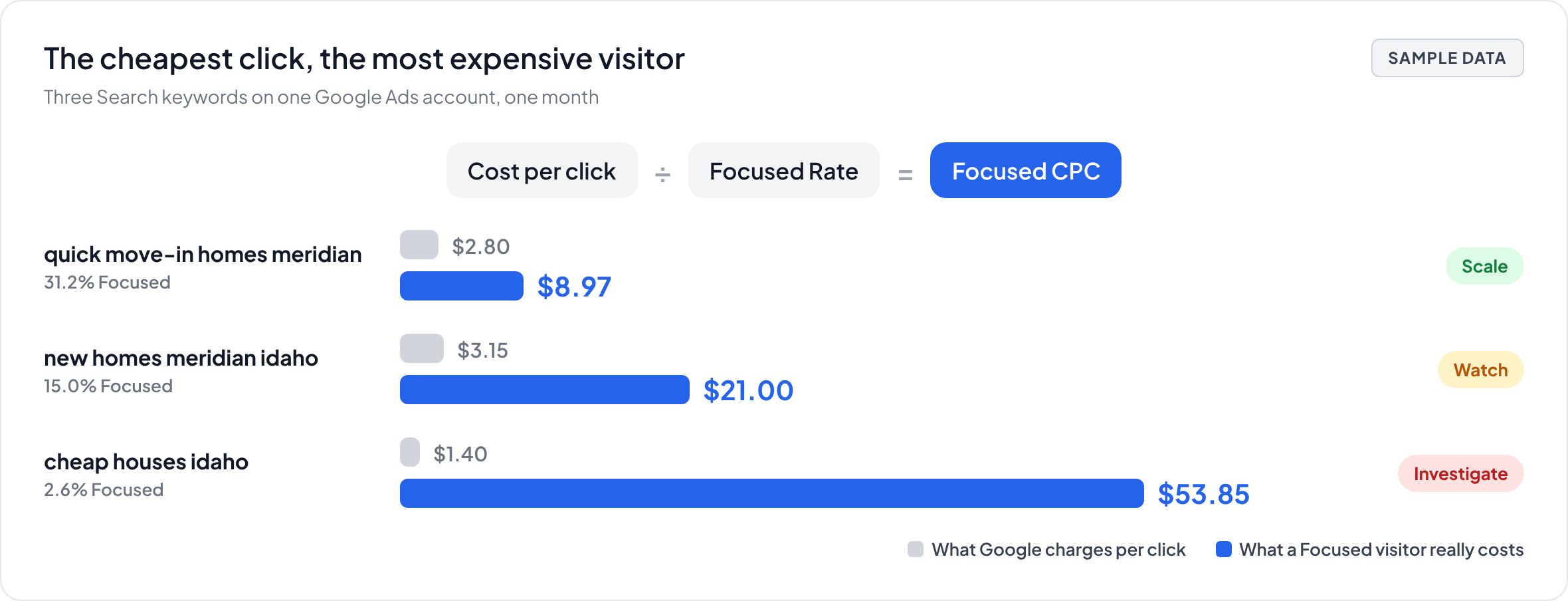
In short: Focused CPC is your cost per click divided by the Focused Rate, the share of a campaign's visitors who are Focused, and Focused CPM is the same for 1,000 visitors. If a quarter of a campaign's visitors are Focused, each Focused visitor costs four times the click. Connect Google Ads and Bread & Butter calculates both for every campaign type, campaign, keyword, landing page and region, once your account's first 15 days are over. The Ads Spend report sets them next to a Scale, Watch or Investigate verdict, flags keywords sent to the wrong page, and suggests up to three budget shifts at the same total spend. Bread & Butter only reads your Google Ads account and never changes your budgets.
How it's calculated
Bread & Butter takes what Google charged and divides it by the Focused Rate of the visitors it bought.
- Focused CPC = cost per click ÷ Focused Rate
- Focused CPM = cost per 1,000 impressions ÷ Focused Rate
A cheap click that brings no Focused visitors stops looking cheap. A keyword at twice the cost per click can be the better buy if three times as many of its visitors are Focused. CPC and CPM come in from Google Ads the day you connect. The Focused figures need a little history, so they appear once your account's first 15 days are over. See Understanding the Focused Rate and Focused CPM for paid traffic.
Why paid traffic includes clicks no buyer is behind
Paying for a click doesn't mean a person clicked. In 2024, automated traffic outweighed human activity on the web for the first time in a decade, according to Imperva, and ad networks are clicked by bots, scrapers and click farms like everything else. Add the accidental taps and the visitors who leave before the page loads, and a large share of what a campaign is charged for brings nobody.
Bread & Butter leaves all of that out of your Focused visitors. Every number in the Ads Spend report counts people, so you can see which campaigns and networks are spending your budget on clicks that bring no one.
Where you see it
Connect Google Ads and run the Ads Spend report in your AI assistant. Every campaign type, campaign, keyword, landing page and region shows what 1,000 visitors cost against what 1,000 Focused visitors cost, and every keyword shows its CPC against its Focused CPC, with the Engaged Leads it brought and its verdict. The report also shows what each campaign type cost per Engaged Lead and per Won/Closed. See Ads Spend report.
What the verdicts mean
Each campaign, ad group and keyword is judged against your own account's paid Focused Rate, not against other advertisers. Scale means Bread & Butter is 90% confident it does better than your paid average. Investigate means it is 90% confident it does worse. Watch is given when the data never reaches 90% confidence either way. Before a verdict, an item shows its status, such as Calibrating with the date a verdict is expected.
Investigate is a prompt to look closer, not an instruction to pause. A keyword can cost more per Focused visitor and still be worth running: a brand term defending your name, or a feeder into a long buying cycle. Bread & Butter never tells you to pause anything; that decision stays with you. See How do I use the Attribution report to optimize my marketing budget?
Keywords sent to the wrong page
Sometimes the ad isn't failing; the page it lands on is. Every Ads Spend report checks for keywords whose Focused Rate is well below your paid average while a page on your website that matches the search does better. Each one is listed with the page it lands on, the page it should land on and the expected gain. The fix is to change the ad's final URL, not to cut the keyword.
Budget shifts
The Ads Spend report turns the verdicts into at most three budget shifts, in order of expected gain. Your AI assistant writes them from the report's data, following the same rules every time:
- Money moves only from a campaign or keyword marked Investigate or Watch to one marked Scale.
- Your total spend stays the same. It never recommends adding budget.
- A shift moves at most 25% of the source's monthly spend, and only to a destination with at least 100 Focused visitors in the period.
- Each shift states the amount, where it comes from, where it goes and the expected gain in Engaged Leads a month.
- When a keyword with a good Focused Rate lands on the wrong page, it suggests the landing page fix instead.
If nothing meets the rules, it says there is no shift to recommend this period.
Bread & Butter never changes your budgets
Bread & Butter only reads your Google Ads account. Every change is yours to make in Google Ads, and you don't need to come back and record it. Bread & Butter keeps the daily spend of every campaign and keyword, so when spend moves from some to others from one week to the next, it records a budget shift. A fall with no matching rise is recorded as a cut, and a rise with no matching fall as an increase.
Each one appears on the Budget changes timeline in the Ads Spend report, plotted against your Focused CPM and Engaged Leads, so you can see what each change did. The items involved go into a second round of calibration that counts only what happened afterwards. The Impact to date card shows your Focused CPM month by month since you connected Google Ads, the card to show whoever signs off on the budget.
Related
- Understanding the Focused Rate and Focused CPM for paid traffic
- Ads Spend report
- Connect Google Ads
- How do I use the Attribution report to optimize my marketing budget?
- Does Bread & Butter tell us which campaigns are worth investing in?
- What is Focused Score and how does it evaluate my traffic?