
What are the different team roles and what do they have access to?
Bread & Butter doesn't charge per seat, so invite everyone who touches a lead, a campaign or an invoice. Each person gets one of five roles, and the role decides what they see in the dashboard and what their AI assistant can see once it's connected.
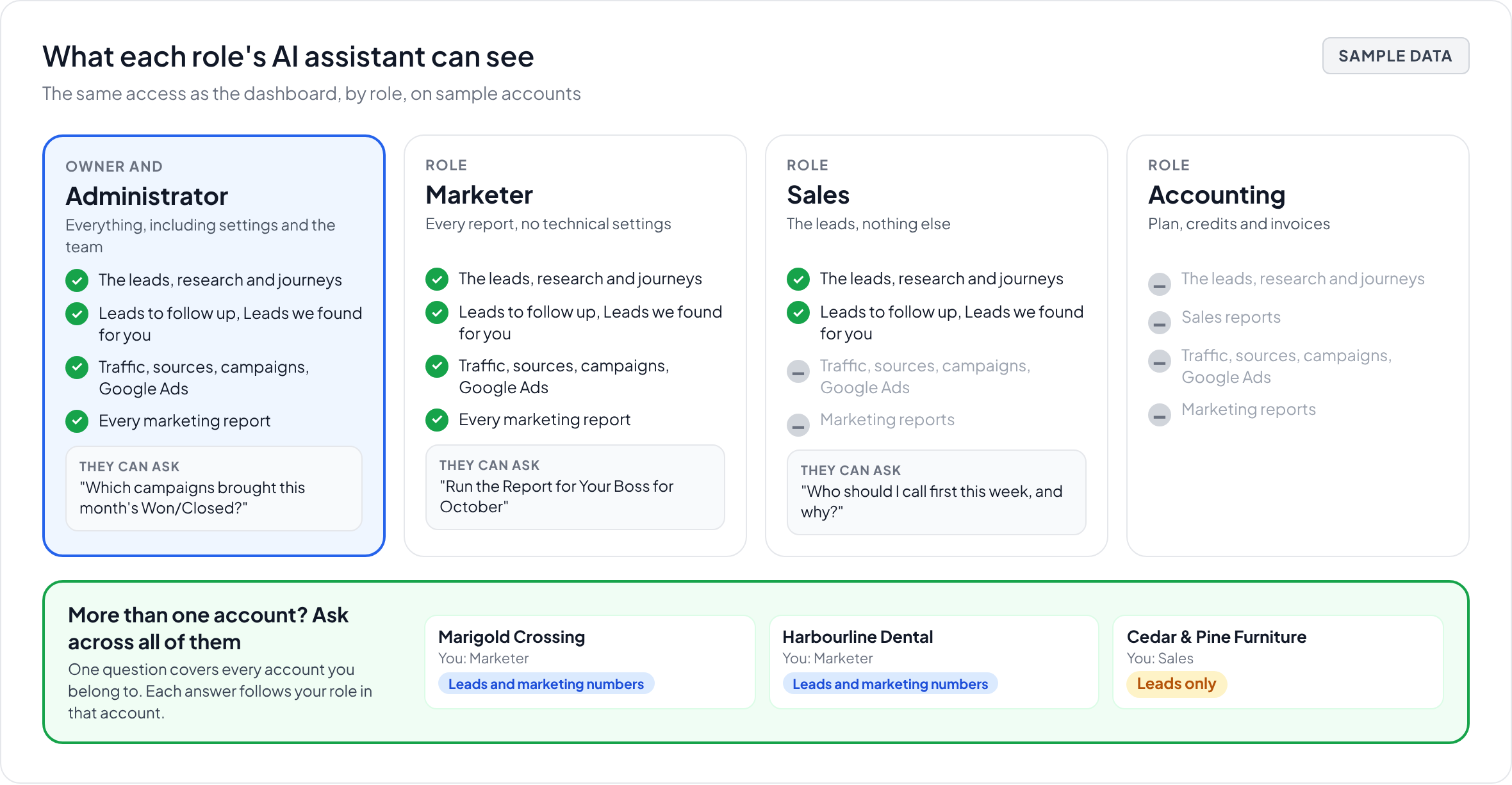
In short: Owner and Administrator see and change everything. Accounting looks after the plan and the invoices, with no AI assistant access. Marketer sees every report and runs Nurture, without the technical settings, and can ask their AI assistant about traffic, sources and campaigns. Sales sees the leads, their profiles and their journeys, and can ask their AI assistant about them and run the two sales reports, but not traffic, attribution or ad spend. Anyone who belongs to more than one account can ask their AI assistant across all of them at once, with the role they have in each. Only the Owner and Administrators can invite people.
The five roles
Owner. The person who created the account. Everything an Administrator can do, plus the account itself: only the Owner can close it or hand it to someone else. To change the Owner, contact support through the chat.
Administrator. Full access: every setting, every integration, billing, the tracking code, the conversion tools, Lead Gen Autopilot, lead stages and the team. The rules that send Engaged Leads to a CRM and the Focused Score settings are Administrator-only.
Accounting. The plan, payment details, credits and monthly invoices. No dashboard, no reports, no settings and no AI assistant access. For the finance person who shouldn't have to ask an Administrator for an invoice.
Marketer. The Dashboard, the Focused Index, Attribution, Insights, Nurture and every report, without the technical configuration. Marketers see what the campaigns bring and act on it; they don't change integrations or the tracking code.
Sales. The leads: the Dashboard, every profile, the research, the journeys and the Nurture Action Queue for their own follow-ups. Sales doesn't see Attribution, Ads or the other marketing reports, and can't change campaigns, settings or the automated emails.
What each role sees
|
|
Owner and Administrator | Accounting | Marketer | Sales |
|---|---|---|---|---|
| Dashboard, profiles, journeys, research | Yes | No | Yes | Yes |
| Nurture Action Queue | Yes | No | Yes | Yes |
| Focused Index, Attribution, Insights | Yes | No | Yes | No |
| Settings, integrations, tracking code, conversion tools | Yes | No | No | No |
| Plan, credits, invoices | Yes | Yes | No | No |
| Invite and remove team members | Yes | No | No | No |
| AI assistant: questions about the leads, and the two sales reports | Yes | No | Yes | Yes |
| AI assistant: traffic, sources, campaigns, Google Ads, and the marketing reports | Yes | No | Yes | No |
| AI assistant: questions across every account you belong to | Yes | No | Yes | Yes |
What your AI assistant can see, by role
Once your AI assistant (Claude, ChatGPT, Copilot or another) is connected to Bread & Butter, it sees exactly what your role sees in the dashboard, no more. It can look things up and build reports, but it can't change anything. See Bread & Butter MCP server connections.
Sales can ask about the leads: who someone is and the company behind them, the research, what they read and when, how they raised their hand, and who came back this week. And run the two sales reports:
- Leads to follow up: who came back this week, who is ready to call and why, who is going cold. Run it weekly.
- Leads we found for you: how many Engaged Leads the website captured, how they raised their hand and how far they've gone toward a sale. Run it monthly.
Questions about traffic, sources, campaigns, Google Ads or ad spend get a short note saying which role can answer them.
Marketer, Administrator and Owner can ask anything about the account's visitors, traffic, sources, campaigns and Google Ads, and run every report, including:
- Report for Your Boss: one page for leadership: what's interesting on the website, who was on it and the few numbers that show it's working.
- Scorecard: today, the last 7, 30 and 90 days, the year and all time side by side. Run it daily or weekly.
- Attribution & Leads
- Ads Spend (needs Google Ads connected)
- Email Campaigns
- Exit Destinations
- AI Assistants & GEO
- Old School Website Analytics
Accounting has no AI assistant access.
To have a report arrive on its own, see Run your Bread & Butter reports on a schedule.
Asking across your accounts
If you belong to more than one Bread & Butter account, for example because you run several websites or you're an agency with several clients, your AI assistant can answer one question across all of them: "Which of my accounts had the most Engaged Leads this month?" or "List my clients and how many Focused visitors each had last week."
Each answer follows the role you have in that account. If you're a Marketer on one account and Sales on another, the marketing numbers come back for the first one only. Each account you ask about uses that account's credits. To ask about one account, name its website: "Run the Scorecard for marigoldcrossing.example".
Inviting your client as an agency
If you're a digital agency running Bread & Butter for a client, you can give the client's team their leads without opening up your performance reporting. Add them with the Sales role. They'll see the dashboard, open lead profiles, use research and run the two sales reports, in the dashboard and in their own AI assistant, but not Attribution, Ads Spend or the other marketing reports.
That leaves you free to work through the reporting first: move budget toward the channels and keywords that bring Focused visitors, fix landing pages, and walk your client through the results when you're ready. You can change their role at any time from the Team page.
Adding people
Open Team in the left menu, enter the email address, pick the role and send the invitation. The person continues with an account they already use, such as Google or Microsoft, so there's no password to set. You can resend an invitation or change a role at any time from the same page.